General information (PG PT)
On SIBS Backoffice you have a dedicated menu to change your general settings of your account.
Please, click on your profile name and go to “Settings” to enter on the user settings page.

On SIBS Backoffice you have a dedicated menu to change your general settings of your account.
Please, click on your profile name and go to “Settings” to enter on the user settings page.
In order to see the merchant stores associated to your SIBS Backoffice account, go to the menu “Operational Data” and click on “Stores”.
The page will display a list with the stores to which you have been granted access.
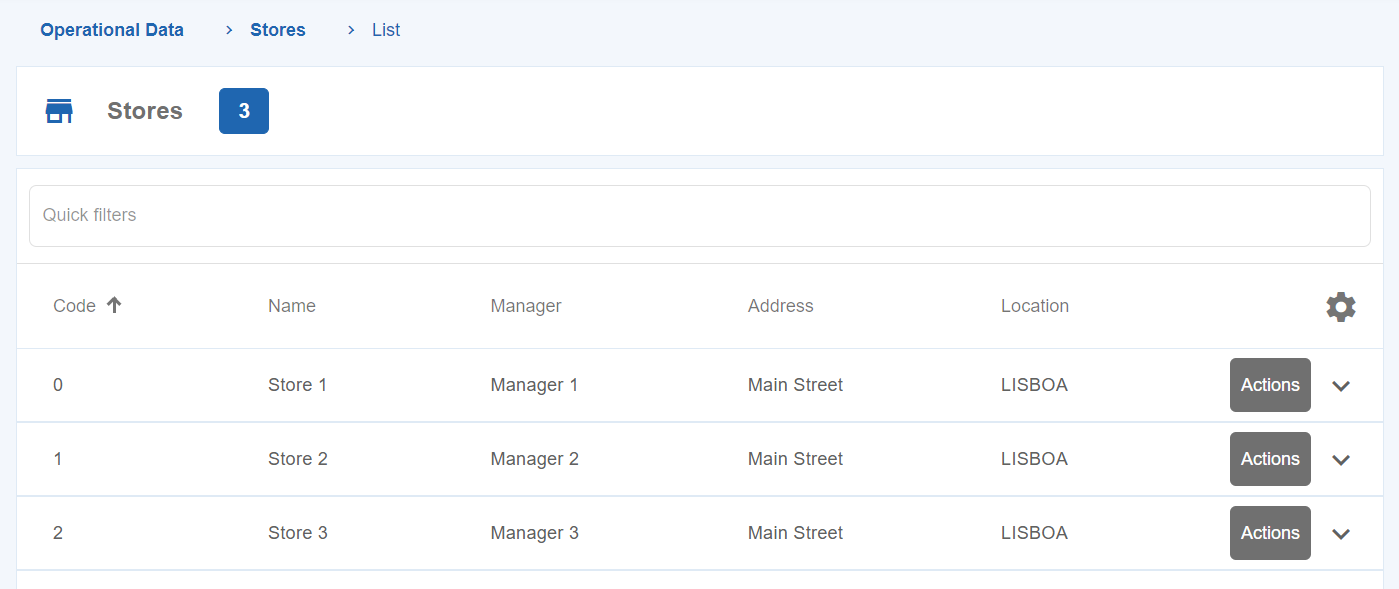
You can also filter the Stores, by providing the following available keywords: “Code”, “Name”, “Manager”, “Address” and “Location”.
In order to check the details of a specific store, go to “Operational Data” > “Stores”.
Click on the “Actions” button of the store you want to check and then click on the “Details” button.
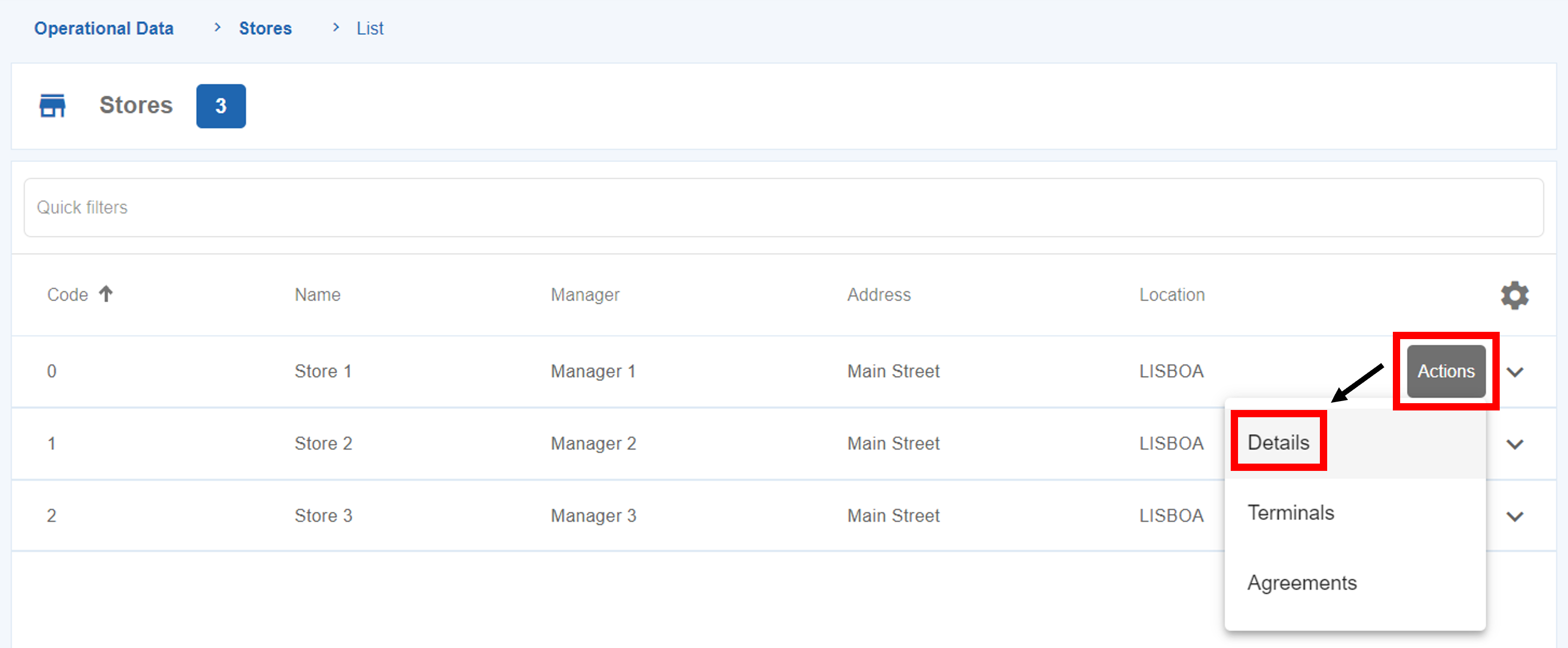
After that, a page with all the information related to that specific store will be provided.
On this page you can also edit some information regarding the Store, such as the “Name”, “Address” and “Location”.
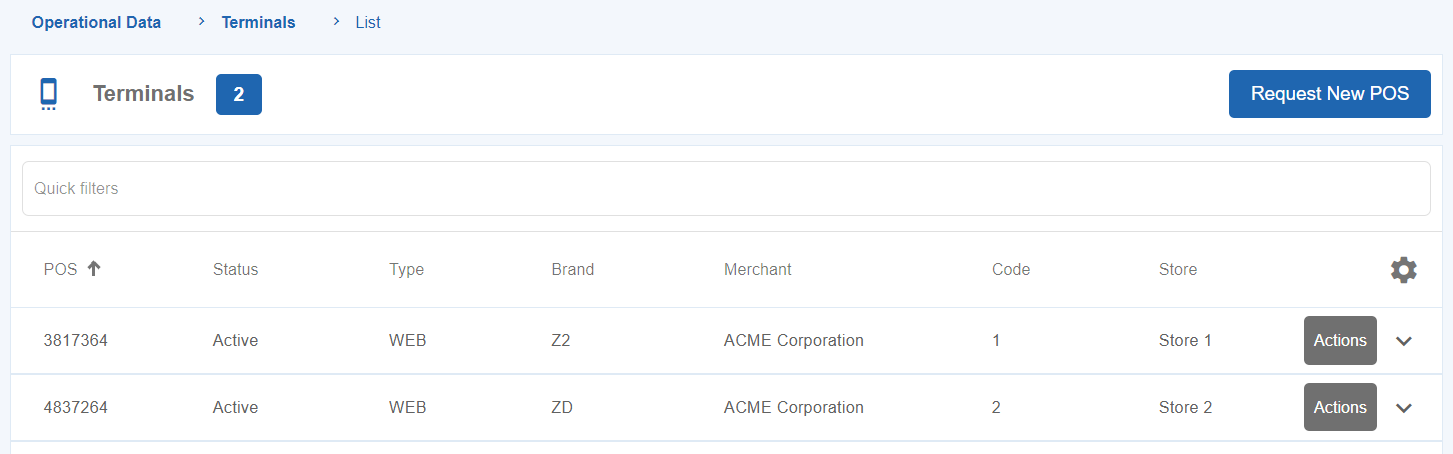
In order to see the terminals associated to the merchant account, go to the menu “Operational Data” and click on “Terminals”.
You can also filter the terminal list, by providing keywords such as: “Brand”, “Merchant”, “POS”, “Status”, “Store”, “Type”, etc.
On SIBS Backoffice, one of the features available is the capability to request a new terminal for your business needs.
In order to execute a terminal request, go to “Operational Data” > “Terminals”.
By clicking on the “Request New Terminal” button, you will be redirected to the following form.
Fill the form according to your needs.
After choosing the type of terminal, the field “Authorised Operations” appears, which allows you to choose which operations you want to perform in the new terminal.
Click on “Confirm” in order to validate your terminal request.
In order to check the details of a specific terminal, go to “Operational Data” > “Terminals”.
Click on the “Actions” button of the terminal you want to check and click on the “Details” button.
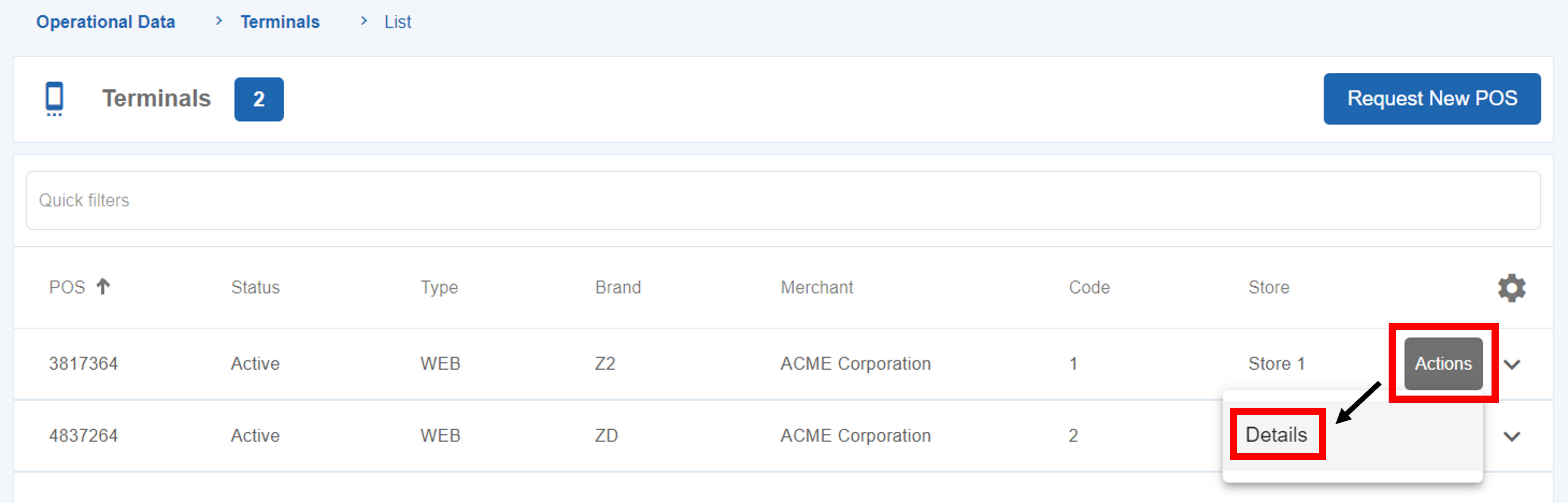
After that, a page with all the information related to that specific terminal will be provided.
On the transaction and reconciliation list screens of SIBS Backoffice you can perform the following actions:
In the sections bellow you will be able to seek information regarding each feature.
To make a payment for an Authorization type transaction, click on the “Actions” button of an Authorization and then click on “Collect Payment” option.
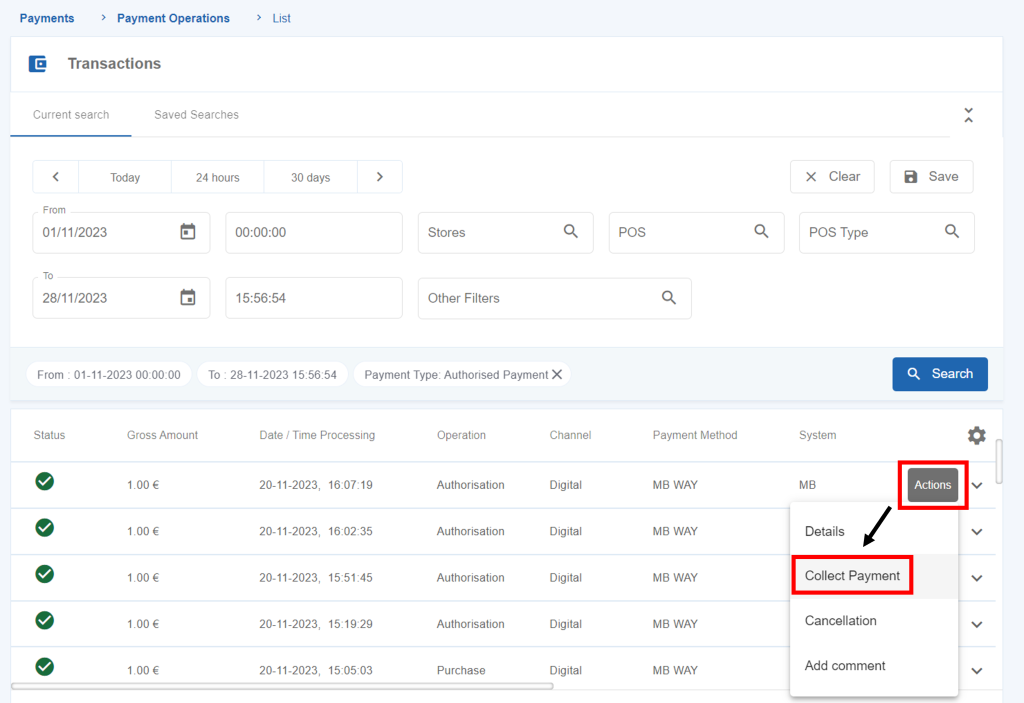
After that, select the desired amount in the “Enter the total or partial amount you want to capture” field and click on the “Collect Payment” button.
Merchants who make partial payments/captures can choose to identify each payment using the split shipment feature.
This feature is designed for split deliveries, for example.
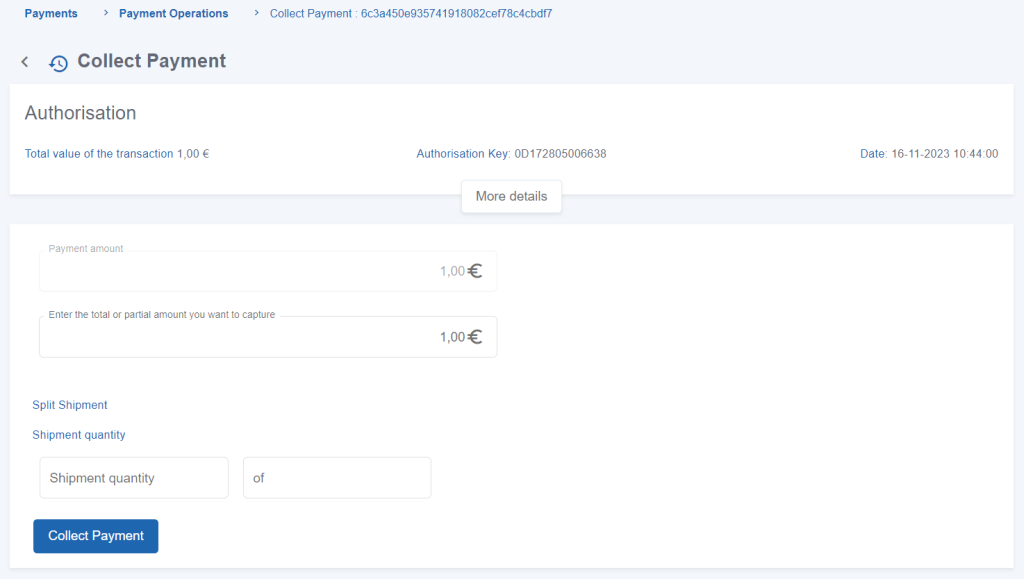
To collect an Authorisation payment using Split Shipment, click on the “Actions” button of an Authorization and then click on “Collect Payment” option.
When performing a payment, in the “Collect Payment” page, two fields regarding Split Shipment will be available.
You can use the available fields to identify the number of payments and the expected total of payments needed.
Split Shipment operations are identified with an icon in the “Payment Operations” menu.
To cancel an authorization, the User must click on the “Actions” menu of the transaction and click on the “Cancellation” option.
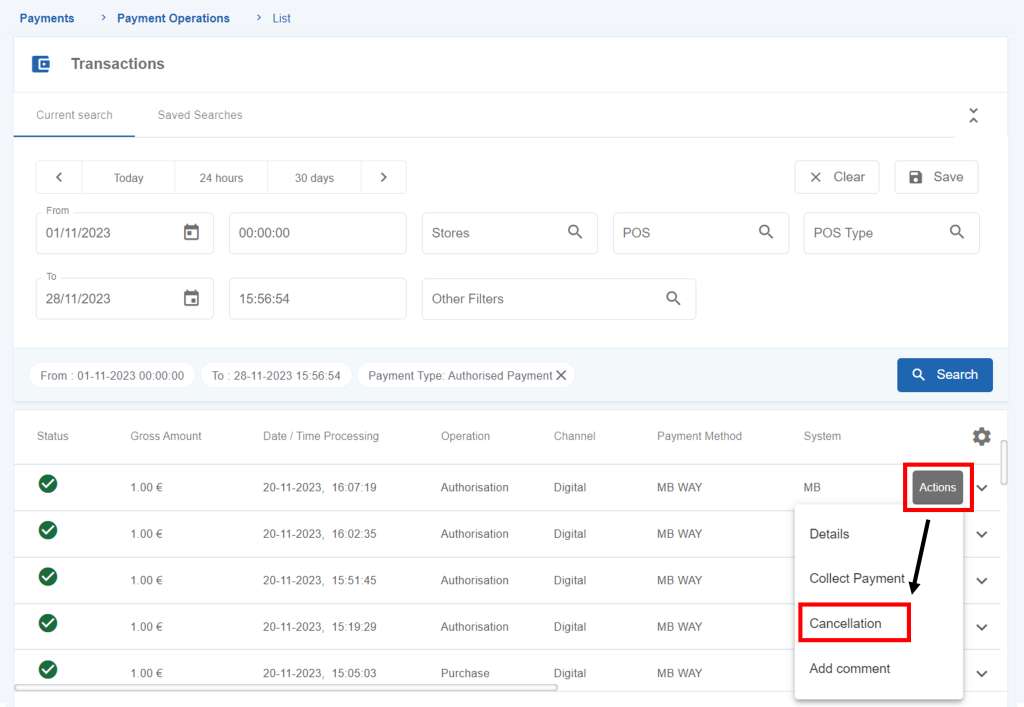
After that, click on the “Cancelled ” button and confirm your operation.
SIBS Backoffice allows you to refund transactions executed in a digital or a physical terminal.
To refund a purchase, click on the “Actions” button of a transaction and then click on the “Refund” option.
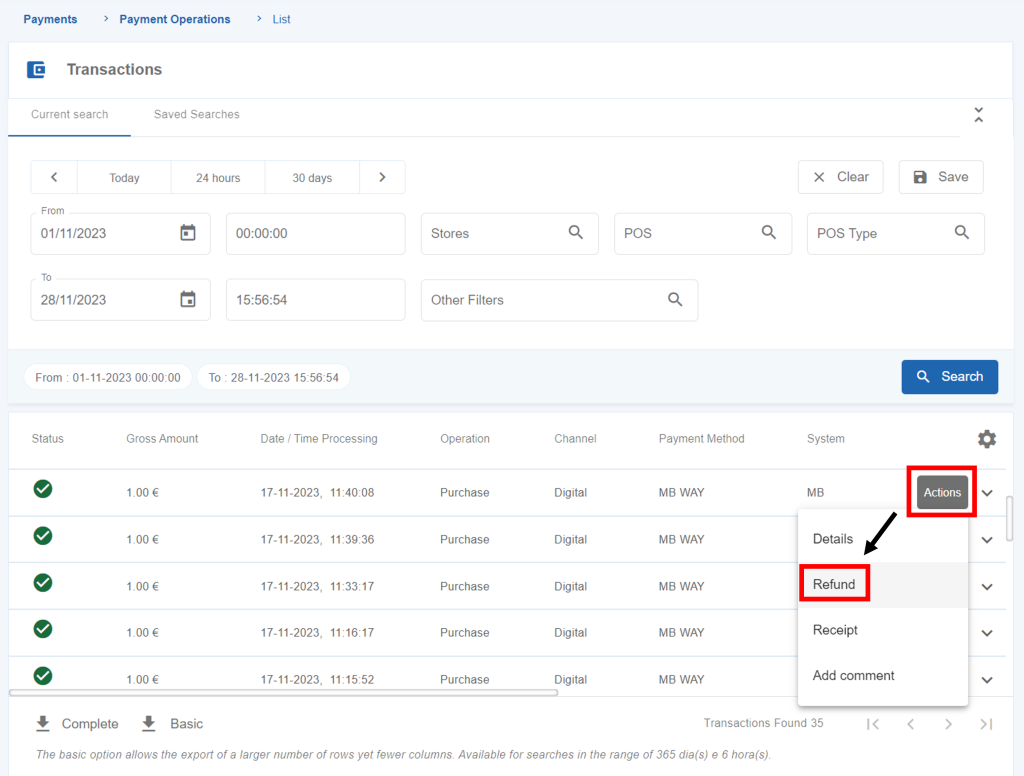
Next, you should fill the amount to be refunded and click on “Refund”.
In order to complete this action you insert your password and click on the “Confirm” button.
By successfully performing a refund, an operation with “Refund” type will be recorded on SIBS Backoffice.
SIBS Backoffice offers the possibility of issuing transaction receipts of purchases and refunds. These receipts can be sent by e-mail via SIBS Backoffice or downloaded as PDF.
To issue a receipt, click on the “Actions” button of a specific transaction and then click on “Receipt”.

Enter the client’s e-mail and click “Send” or choose to “Download as PDF”.
In the chapters available below you will be able to seek information regarding each feature.
In the “Payments” menu > “Payment Operations” you can see all the transactions in real-time or you can also filter transactions based on several criteria.
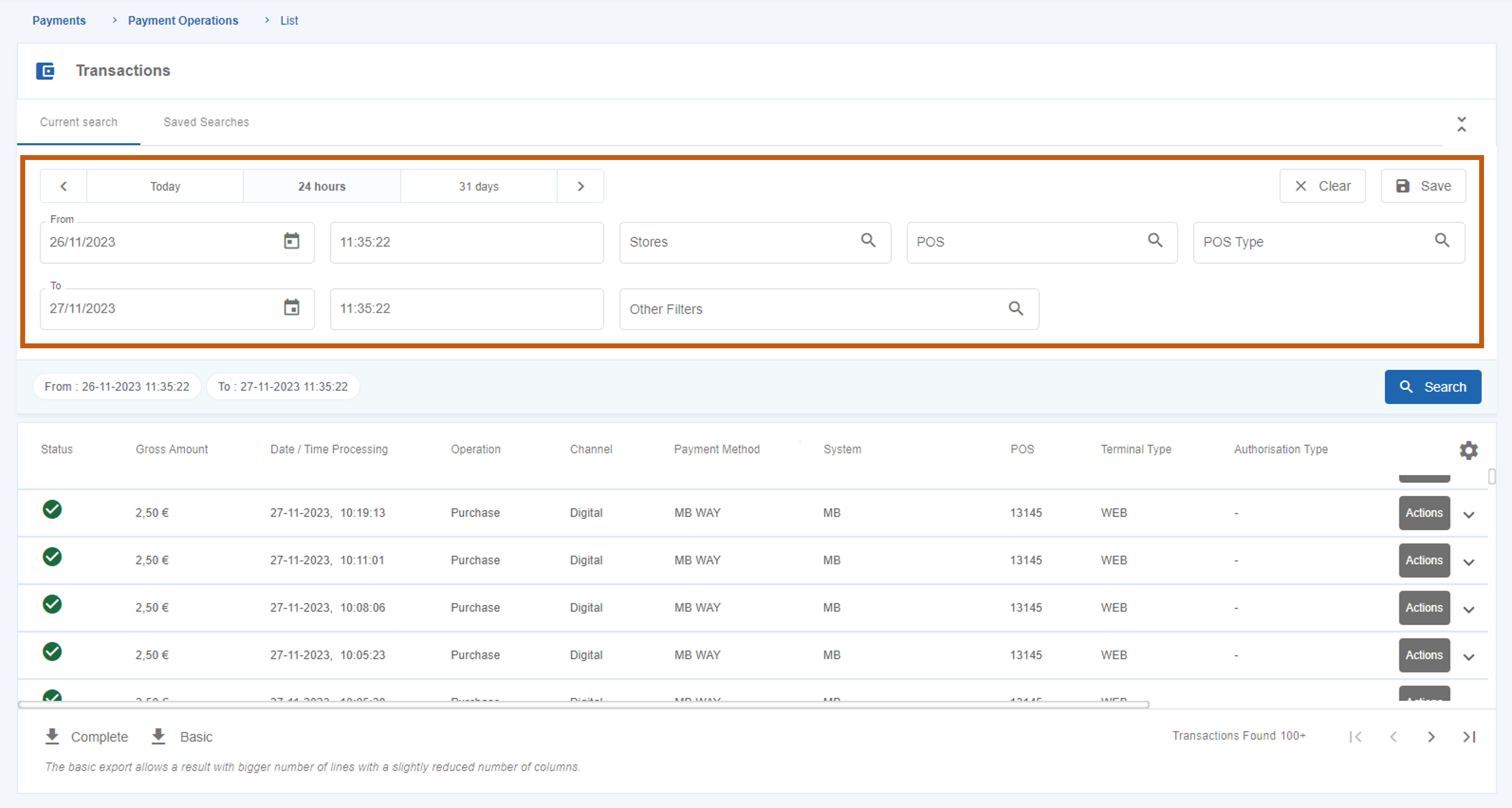
The general filters available in the page are:
This filter allows you to filter per period of time.
You must define the start and end date, or one of the default periods of time:
You can also filter transactions by “Store”. The available stores will be visible on filter field.
This filter allows you to filter by POS terminal and you can filter by up to ten different POS terminals.
This filter allows you to filter by the type of terminal used for transactions (e.g. mPOS, smartPOS).
In order to filter based on other criteria you can insert one or more filters in the “Other Filters” field.
The available transaction filters are the following:
| Field | Value |
|---|---|
| Acquirer | Choose an option |
| e-Commerce authentication | Choose an option |
| Channel | Choose an option |
| Card | Editable |
| Maximum Fees | Editable |
| Minimum Fees | Editable |
| Client e-mail | Editable |
| Operator email | Editable |
| EAT | Choose an option |
| Payment Entity | Editable |
| Split Delivery | Choose an option |
| Status | Choose an option |
| Merchant operation ID | Editable |
| Transaction ID in the channel | Editable |
| Authorisation ID/ARN | Editable |
| Authorised Payment ID | Editable |
| DCC indicator | Choose an option |
| Fallback indicator | Choose an option |
| Brand | Choose an option |
| Authentication method | Choose an option |
| Payment method | Choose an option |
| Data Retrieval Mode | Choose an option |
| Payment method | Choose an option |
| Maximum Gross Amount | Editable |
| Minimum Gross Amount | Editable |
| Exact Gross Amount | Editable |
| Exact Net Amount | Editable |
| Maximum Net Amount | Editable |
| Minimum Net Amount | Editable |
| Operation | Choose an option |
| Terminal Period | Editable |
| Express QR Code | Choose an option |
| Recurring | Choose an option |
| MB Reference | Editable |
| System | Choose an option |
| MB WAY Mobile Phone | Editable |
| Authorization Type | Choose an option |
| Card Type | Choose an option |
| MIT Type | Choose an option |
| MIT Transaction Type | Choose an option |
| Offline Transaction | Choose an option |
| Maximum Deferred Amount | Editable |
| Minimum Deferred Amount | Editable |
While carrying out a search you can choose a filter in the “Other Filters” and then press the “+” button, as shown in the picture below.
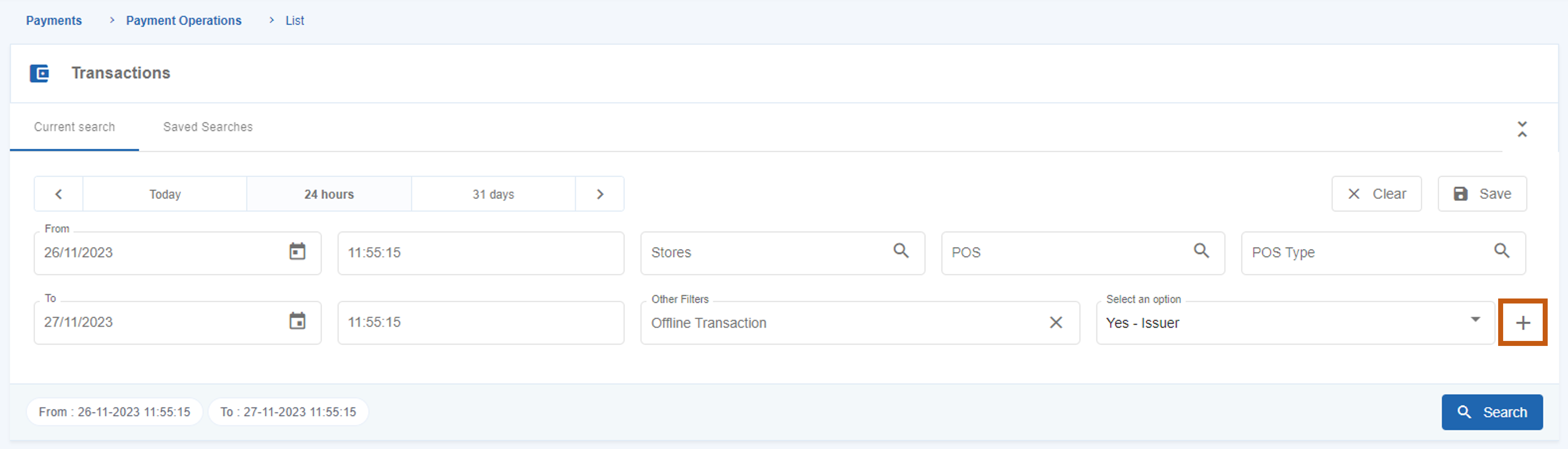
The selected filter will move to the search line. You can add other filters using this same method until your search criteria is complete.
After selecting the intended filters, you can save a search, by pressing the “Save” button available in the page.
After that, a window will pop up asking you to name the saved search.
The search will be available in the “Saved Searches” tab.

In order to view the details of a transaction, you must click in the “Actions” button of the transaction and then click in “Details”.
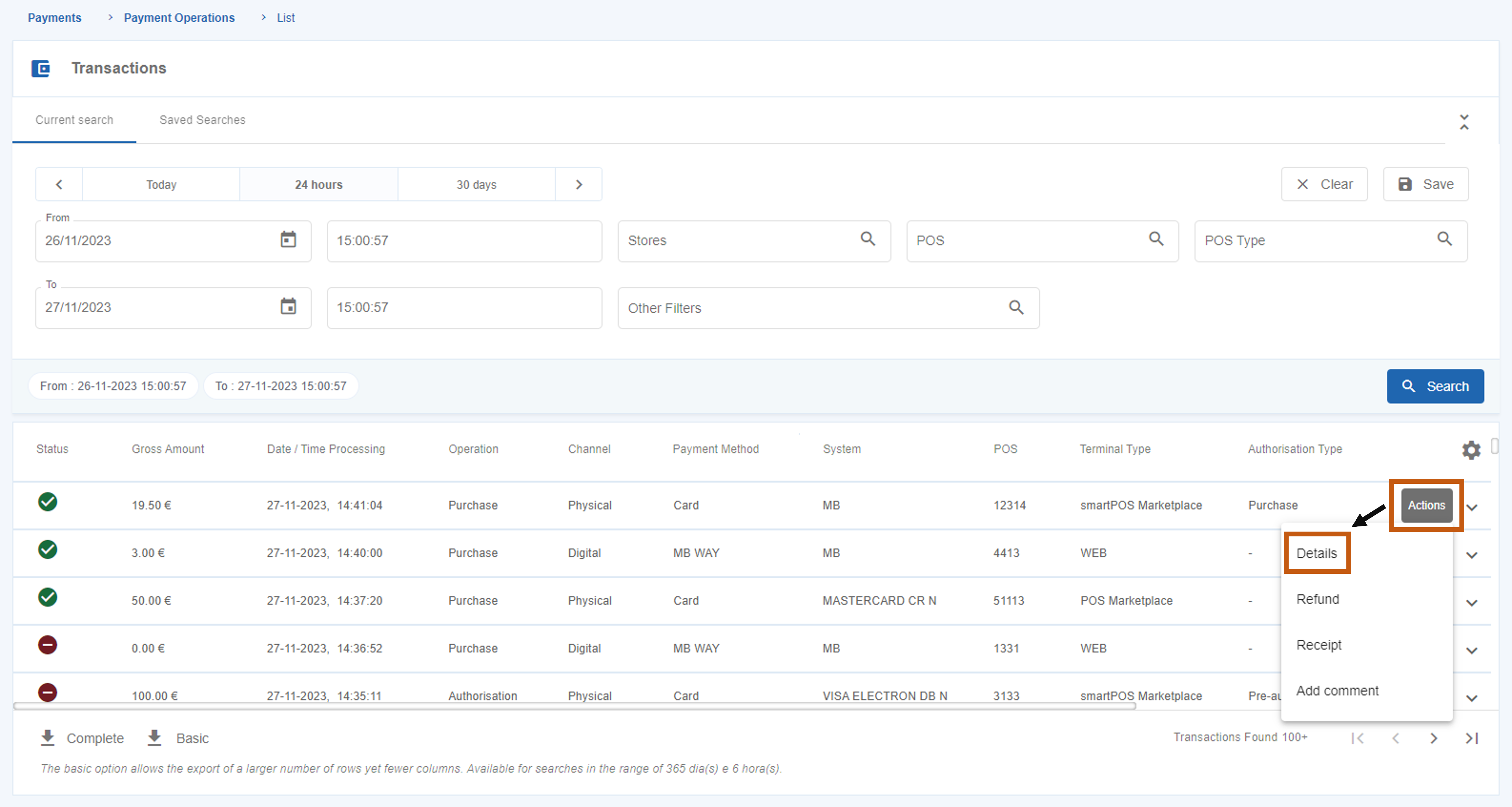
The table below details all the fields displayed on the transaction details. These fields can differ depending on the transaction type.
| Field | Description |
|---|---|
| Date / Time Processing | Date and time when the transaction was processed. |
| Terminal Date / Time | Date and time recorded on the terminal when the transaction was processed. Note: It may differ from the processing date and time, particularly on physical terminals. |
| Operation | Type of transaction (e.g. “Purchase” or “Refund”). |
| Gross Amount | Gross amount of the transaction. |
| Net Amount | Net amount of the transaction. |
| Deferred Value | Value of the transaction processed on a deferred basis. Note: Deferred payments are payments for goods and services where the debit to the customer’s account does not occur immediately but at a later date, to be agreed with the payment service provider. Consequently, the date of compensation to the Merchant is also affected. |
| Commissions | Commissions associated with a transaction. Note: SIBS Backoffice does not show commissions for Service Payment transactions. |
| Currency code | Transaction currency code. Has the fixed value 978 – Euro. |
| Status | Transaction status (e.g. “Completed”, “Declined”). |
| Authorisation Type | Identifies the type of authorization operation (e.g. incremental authorization). |
| Error Reason | Informs the error code that occurred in the rejected operations. Note: successful operations are associated with the code “00.000.0000”. |
| Error Description | Gives a description of the error. |
| Channel Transaction ID | Identification of the transaction channel at SIBS. |
| Id (Merchant) | Identification of the Merchant (assigned by the Merchant). |
| Authorisation Id / ARN | Identification of the payment system authorization. |
| Authorisation Key | Identification of the transaction at SIBS. |
| Original Authorisation Key | Identification of the associated transaction in SIBS. |
| External Original Authorization Key | Secondary identification of the transaction in SIBS. |
| Authentication Method | Identification of the authentication method used. |
| Acquirer | Identification of the Acquirer of the transaction. |
| TSE | Identification of the Terminal Support Entity |
| Authorised Payment ID | Identification of the Authorized Payment token. |
| DCC indicator | Identifies whether the transaction used Dynamic Currency Conversion (DCC). DCC is an option for foreign cardholders that allows payment in the card’s home currency or in Euros. |
| Amount in Original Currency | Identification of the amount in the original currency. |
| Fall-Back Indicator | Identifies whether the transaction was decided on a track because the chip data could not be read. |
| Offline Transaction | Identifies whether the transaction was carried out offline. |
| Field | Description |
|---|---|
| Merchant | Merchant identification in SIBS systems. |
| Store | Identification of the Merchant’s establishment to which the terminal where the transaction was made belongs. |
| Field | Description |
|---|---|
| POS | Identification (number) of the terminal used in the operation. |
| POS brand code | Identifies the brand and model of the terminal (e.g. ZD). |
| Terminal Type | Identifies the type of terminal used (e.g. SmartPOS or WEB). |
| Accounting Period | Identifies the accounting period of the terminal used. |
| Field | Description |
|---|---|
| Channel | Identifies the type of channel (e.g. digital or physical). |
| Acceptance network code | Identifies the network acceptance code. |
| Acceptance channel Type Code | Identifies the type of acceptance in the channel. |
| Field | Description |
|---|---|
| Payment Type | Identifies the payment mode used, associated with the payment method (e.g. “Contactless” or “QR Code”). |
| QR Code Express Description | Name/description defined by the Merchant when creating the QR Code Express. Valid for transactions with the “QR Code Express” payment method. |
| Scheme | Identifies the brand used in the transaction (e.g. “MB”). |
| System | Identifies the financial system or product used in the transaction. |
| Payment Method | Identifies the payment method used (e.g. “MB WAY”, “Card”). |
| Authentication Method | Identifies the authentication method used in a physical terminal transaction (e.g. “PIN”, “Signature”). |
| eCommerce Authentication | Identifies the authentication method used in a digital or virtual terminal transaction (e.g. “3DS”). |
| Merchant Exemption Request | Identification of the request for a Merchant’s exemption regarding authentication. |
| Field | Description |
|---|---|
| Card Data Entry Mode | Identifies the type of authentication of the operation, from the equipment’s point of view (e.g. “Track”, “Contactless”). |
| Country Code | Indicates the country of the card. |
| Presence | Indicates the presence or absence of a card at the time of payment. |
| MB WAY mobile phone | Identification of the MB WAY phone number. |
| Number | Number of the card used, encrypted. |
| Field | Description |
|---|---|
| Code | Customer identification on the merchant. |
| Presence | Indicates whether or not the owner of the card is present. |
| Billing Client Name | Identifies the customer’s name. |
| Customer’s e-mail address. | |
| Phone | Identifies the customer’s phone number. |
| Mobile Phone | Identifies the customer’s mobile phone number. |
| Billing Address | Identifies the billing address provided by the customer. |
| Billing Post Code | Identifies the postal code associated with the billing address provided by the customer. |
| Billing City | Identifies the city associated with the billing address provided by the customer. |
| Card Country Code | Identifies the country associated with the billing address provided by the customer. |
| Shipping Address | Identifies the shipping address provided by the customer. |
| Shipping Postal Code | Identifies the postal code associated with the delivery address provided by the customer. |
| Shipping City | Identifies the city associated with the shipping address provided by the customer. |
| Shipping Country Code | Identifies the country associated with the delivery address provided by the customer. |
| Field | Description |
|---|---|
| Payment Owner Code | Code of the SIBS merchant that generated the reference for payment of services. |
| Payment Entity Code | Identification of the payment of services entity. |
| Payment Entity Reference Code | Number corresponding to the payment of services reference. |
In order to download the list of transactions, click in the “Complete” or “Basic” download button at the end of the Payment Operations page.
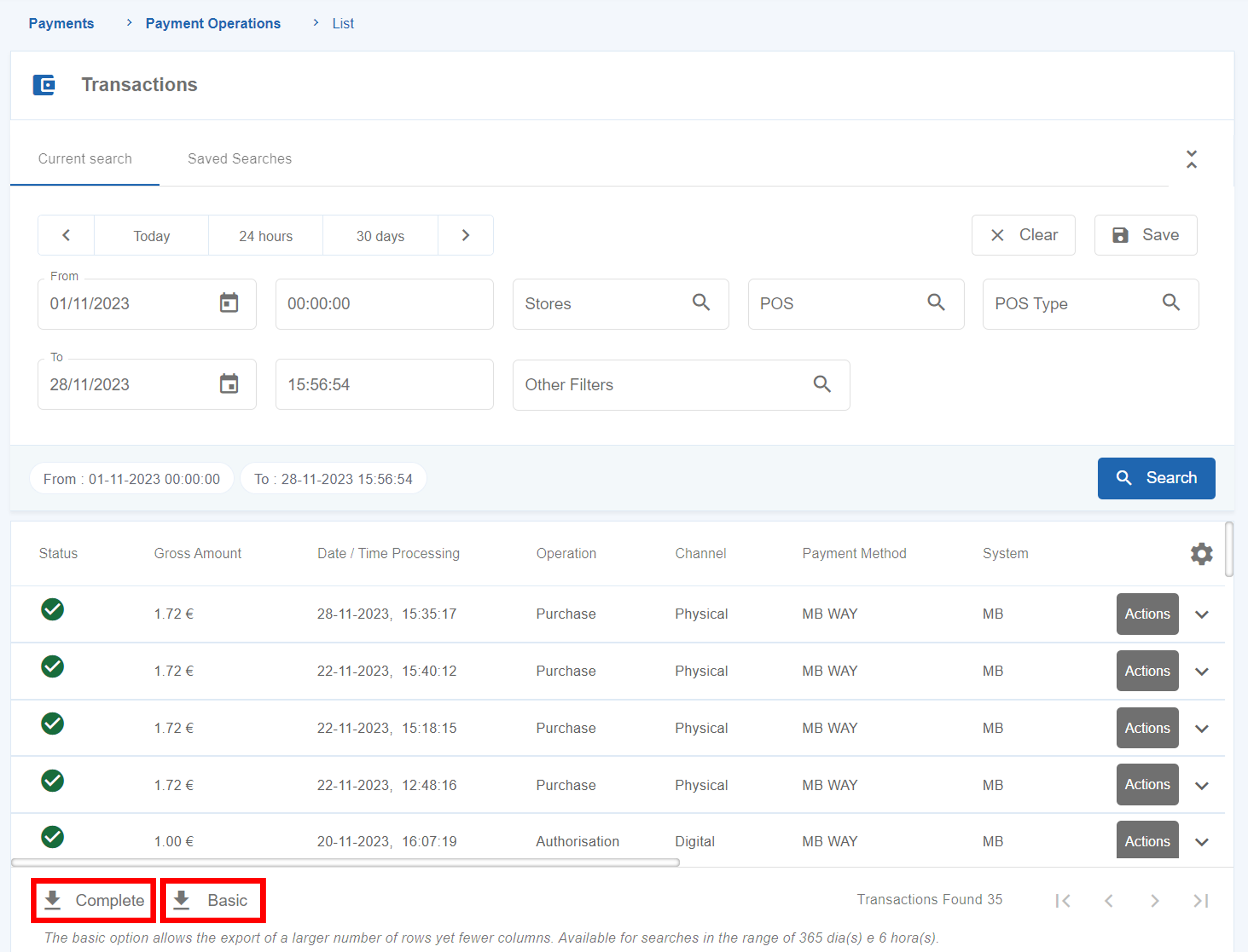
The two types of download differ in:
In both export options, if the “Transactions Found” list returns a value higher than the defined limit the application will not be able to export all the transactions. In these cases, an informative pop-up is displayed with the time window considered in the export.
The “Reconciliation Operations” submenu allows the Merchant to search and check details of reconciliations.
The reconciliation procedures depend on the type of terminal:
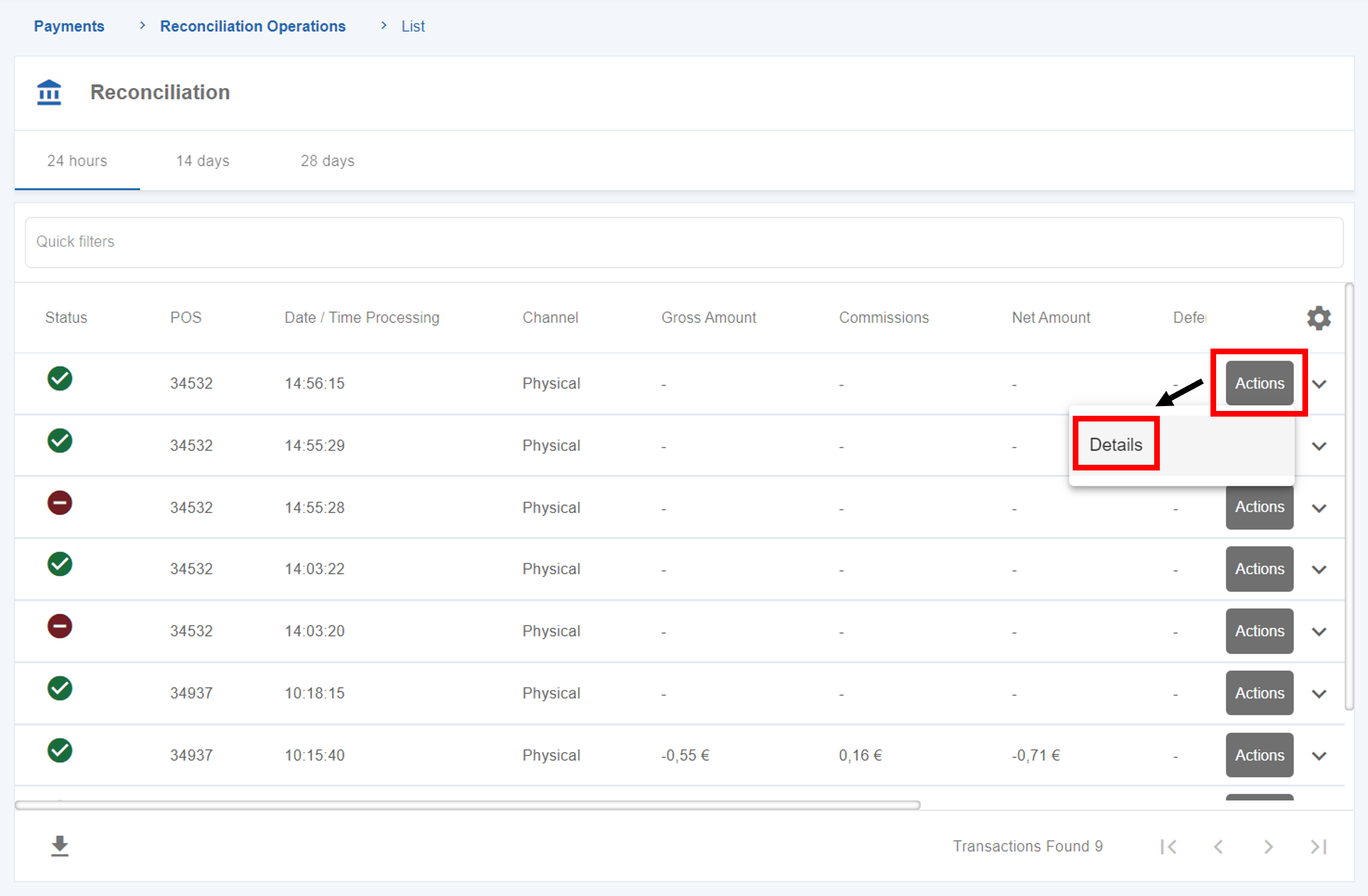
To check the details of a reconciliation, click on the “Actions” button of a reconciliation and then on “Details”.
The “Events and Audits” menu serves as a directory in which all actions executed by the users will be recorded. It will provide information about the type of actions executed, the user involved, the date and the description of the action.
In order to see the actions performed by all the users, you must have the Owner role in SIBS Backoffice. Other users will only see the record of actions from users with hierarchically lower profile types.
In order to see the operations list in SIBS Backoffice, click on “Payments” menu > “Payment Operations”.
On this page you are able to see:
By going to “Payments” menu > “Reconciliation Operations” you are able to see the list of reconciliations and its details.
SIBS provides the tools you need to accept online payments, enabling you to considerably increase your acceptance rate, reduce processing costs and effectively combat fraud.
If online shopping was the future a few years ago, today it’s very much the present. It’s growing every day, along with solutions designed to simplify and make it more secure.
The SIBS Gateway is one of the latest developments in the area, as it allows the management of online payments made with all the main Card brands, MB WAY and Multibanco references.
In addition, it makes it possible to obtain reports and manage online payments in an unified manner. It is a solution with the quality, security and innovation capacity for which the SIBS brand is already well known.
The SIBS Gateway solution is designed for merchants with an online presence. To sign up, simply go to your bank and choose the service that best suits your business, or use the SIBS contact form, indicating the name of your bank.
Coming soon.
MB WAY is the MULTIBANK solution that allows you to make purchases online and in physical shops, generate virtual MB NET cards, send, request money and split your account, as well as use and withdraw money via your smartphone, in its own app or through your bank’s channels.
The MB WAY app is available for Android and iOS smartphones and tablets.
The MB WAY app is available from version 2.0 onwards. We recommend that you always upgrade to the latest version in order to benefit from new features and improved experiences.
There are no costs associated with downloading, joining and using the MB WAY app. MB WAY does not charge any commission for operations carried out on the app. Only transfers may have associated costs charged by the banks.
Online purchases with a telephone number, purchases with an MB NET card, as well as the generation and use of MB NET cards, purchases at a physical point of sale with a QR Code or NFC, MB WAY withdrawals are free, as is the use of MB Challenge benefits.
In addition, before “Sending money” via an immediate transfer, the MB WAY app clearly shows the user the amount, if any, that will be applied, and the user can cancel the operation at that moment.
To shop online at participating merchants, simply select the MB WAY payment method, then enter your mobile phone number and finally confirm the notifications in the app.
The limit set automatically by the service when you join is €1000. You can change this limit directly in the MB WAY app up to a maximum of €5000.
To change this limit, go to Menu “More” > “Settings” > “Security” > “Purchase limits”.
You must confirm your purchase within 4 minutes (depending on the merchant). After this time limit the purchase order expires, in which case you will need to repeat the purchase process to receive a new notification.
On 1 January 2021, the new strong authentication rules for online payments in European Union countries came into force. These new rules consist of additional security measures to ensure correct identification of the cardholder and validation of the transaction. Strong authentication is done with 2 out of 3 of the following factors:
i) Knowledge: something that only the user knows, such as a PIN or password.
ii) Possession: something that only the user has, such as a one-time password (OTP) via SMS or smartphone.
iii) Inherence: something that identifies the user, such as a fingerprint.
For additional transaction security, all online purchases made on secure and certified websites based in European Union countries may require one-time password (OTP) authentication by SMS, in the MB WAY app or in the banking app, as follows:
If you have deactivated notifications, check the notification in the app’s activity area. When making online purchases with MB WAY, using the mobile phone number function, there is no need to re-authenticate as this MB WAY function provides the necessary security for online purchases.
MB WAY Authorised Payments and major recurring purchases and your payments will be quick and convenient.
You can use Authorised Payments to simplify:
Check out the merchants where you can activate this payment.
To make purchases without entering your PIN, you must activate this type of payment at the merchant.
To pay for subscriptions, you must activate Authorised Payments at the merchant.
In the Authorised Payments menu, select the merchant and you will be able to see the amount spent and the details of the transactions made.
If the purchase exceeds the limit you have set for the month, you will receive a notification to accept the purchase and authenticate with your MB WAY PIN.
If the validity of the Authorised Payment is exceeded, you must consult the merchant in MB WAY and change the expiry date in order to continue shopping.
The customer has 3 payment options:
Bank Identification Numbers (BINs) are fundamental to payments. They identify the issuing institution for each cardholder account and enable transactions to be properly routed.
Tokenization is the process of replacing a card’s primary account number (PAN)—the 16-digit number on the plastic card—with a unique alternate card number, or “token.” Tokens can be used for mobile point-of-sale transactions, in-app purchases or online purchases.
Tokenization reduces fraud related to digital payments by making transactions more secure by including a dynamic component with each transaction. It takes the security of a physical EMV chip and applies it to non-card environments including proximity, mobile and internet payments.
Merchants benefit from more secure transactions as well as faster checkout experiences, new payment acceptance options and more ways to sell.
EMV 3DS is an e-commerce fraud prevention protocol that enables consumer authentication for CNP purchases, without adding unnecessary friction to the checkout process.
EMV 3DS helps payment card issuers identify unauthorised e-commerce transactions quickly and accurately to prevent CNP fraud. It enables the exchange of data between the merchant and the payment card issuer to verify that the individual making a purchase with a payment card is the legitimate user of the card.
For e-commerce purchases where EMV 3DS solutions are used, the process works as follows:
The EMV 3DS Specifications provide a common set of requirements that product providers can use to integrate EMV 3DS technology into their solutions to support seamless and secure e-commerce payments.
The EMV 3DS Specifications:
An EMV 3DS transaction utilises consumer data for the purpose of evaluating risk to prevent fraud. Merchants and issuers using this data for this purpose are responsible for complying with applicable privacy laws.
The Opinion of the European Banking Authority (EBA) published on 21 June 2019 recognised that protocols such as EMV 3DS provide a means for merchants and issuers to support the use of SCA. Specifically, EMV 3DS supports SCA by enabling the use of two-factor authentication. Its flexibility allows issuers to accommodate their authentication preferences. Moreover, issuers can consider risk and regulatory factors in deciding how the customer will be authenticated – for example, using a one-time passcode, knowledge-based questions or biometrics.
The Opinion of the European Banking Authority (EBA) published on 21 June 2019 recognised that protocols such as EMV 3DS provide a means for merchants and issuers to support the use of SCA.
The EBA notes that versions 2.0 and newer support a variety of SCA methods, while trying to ensure customer convenience, limiting fraud through data sharing and transaction risk analysis, and enable the use of exemptions set out in the Regulatory Technical Standards (RTS). While EMV 3DS 2.1 supports SCA, EMVCo recommends that v2.2 (or higher) should be considered to access the optimum functionality.
| Term / Acronym | Definition |
|---|---|
| 3-D Secure | Standard authentication method for e-commerce transactions. |
| Accounting Agreement | Agreement in which, in the clearing process, SIBS informs the BAC that it can move those amounts in the Merchant’s account. |
| Acquirer | The Acquirer is responsible for contracting with the Merchants the acceptance of MB, IPS and Private Label card schemes for paying transactions made with those cards to the Merchants. |
| Agreement | The set of parameters for the fees or commissions paid by the Merchant to the Acquirer, for the service provided by the latter. |
| Application Identifier (AID) | Identifier to distinguish the different applications installed on an EMV card chip. |
| Authorisation/Auth | The process by which a transaction is approved or declined. For chip cards, the decision can be made offline. In the case of track/magnetic stripe cards, the transaction is carried out online with the Card Issuer when one of the configured limits are exceeded. |
| Automated Teller Machine (ATM) | Equipment connected to SIBS Network that allows electronic transactions to be carried out through a bank card, according to the card’s operating scheme. It is called Automated Teller Machine because one of the operations available is the cash withdrawal. |
| BAC (Banco de Apoio ao Comerciante) | Merchant Support Bank. The credit institution where the Merchant’s bank account is held. The Merchant Support Banks make their information system available to receive the financial entries in the Merchants’ accounts, resulting from the transactions carried out on the POS terminals. |
| Backoffice | SIBS’ administrative services, supporting the products that SIBS commercialises, including Acquirer Processing Services. |
| Business Portal | Provides Merchants a single point of access to information stored and to setup notifications. |
| Bank Identification Number (BIN) | Unique sequence of digits, assigned by the payment scheme, to identify the card Issuer and the product type. Some products require a dedicated BIN. The BIN is included in the first digits of the Primary Account Number. |
| BSA (Banco de Suporte ao Acquirer) | Acquirer Support Bank. The credit institution where the Acquirer’s bank account is held. The Acquirer Support Banks make their information system available to receive the financial entries in the Acquirers’ accounts, resulting from the transactions carried out under the brands/schemes that they represent. |
| CAE (Código de Atividade Económica) | Standard Industrial Code (SIC). Standard reference to the type of Economic Activity of a company. It must be consistent with the MCC that each brand assigns to a Merchant. |
| Campaign | The campaign is a tool developed by SIBS that allows the creation of occurrences within a standard agreement, in order for the Acquirer to define a new contractual condition whose application takes effect only within a certain time interval. |
| Card | Payment card issued by a bank, used to have access to funds or make purchases. |
| Cardholder | Person who owns a banking card known as Customer. |
| Card personalisation validation | One of the tests that the Issuer of an EMV chip card has to perform before the start of final transactions acceptance. |
| Cardholder Initiated Transaction (CIT) | Transaction initiated by the Cardholder using stored credentials. It is within the scope of the PSD2, requiring SCA (Strong Customer Authentication). It is a required precondition for the subsequent performance of Merchant Initiated Transactions (MIT). |
| Cardholder Verification Method List (CVM List) | The Cardholder Verification Method List (CVM List) is one of the card’s chip parameters that is stored during its logical and physical personalisation and cannot be changed throughout the lifetime of the card. This parameter informs the terminal of the Cardholder authentication methods that can be performed by the card. There are different CVM Lists for each type of card, depending on the payment applications issued on the card. |
| Cardholder’s Authentication | The methods used to verify the authenticity of a Cardholder, such as PIN and signature. |
| Chargeback | The message sent by an Issuer to claim from the Acquirer all or part of an amount in respect of a dispute. |
| Check-Digit | Check digit or digits that result from operations applied to the other digits, and are used to validate that the number as a whole is an allowable number for the field being filled in. |
| Chip | Technology integrated circuit embedded in the card. Term used specifically to describe the chip on the card or the technology itself, in general terms. |
| Chip and PIN | Combination of a secure technology (chip) and a secure cardholder verification method (PIN). |
| Clearing | The process that mediates the exchange of financial details relating to a transaction between the Issuer and the Acquirer. |
| Co-branded Card | Card that combines two distinct Payment Systems: MB and international brand. |
| Contactless | Technology that does not require a physical contact between the card and a terminal, but rather a radio frequency interface for the respective data exchange. |
| Contactless Discover Card | The contactless payment product marketed by Discover/Diners. |
| Conversion Rate | The conversion rate (rate, as interfaced in the POS) is displayed in the POS for transactions made with DCC. It is the value used to convert the purchase value from the euro currency to the card currency; it is the result of the sum of the exchange rate (defined by SIBS adjusted by the forecasts of increase or decrease according to the evolution of the exchange markets) and the mark-up. |
| Credit Voucher | Action by which the Acquirer undertakes the adjustment of a dispute process, following a report from the Merchant. The Credit Voucher automatically credits the Issuer of a card against a debit to the Merchant, where the Merchant has previously made an excessive debit to the Issuer. The Credit Voucher amount is what has been overcharged. |
| Customer | Also called the Cardholder. Person who wants to access the Merchant products or services. |
| Deferred Agreement | The deferred arrangements, entered into between the Acquirer and the Merchant, allow the crediting of the value of purchases to the Merchants, and the respective debiting of the TSC, to take place “N” days (number of days deferred and negotiated with the Merchant) after the Accounting Period Closure/POS Deactivation. |
| Direct Participant in Clearing | After clearing, the balance to be settled is sent to the Direct Participant for settlement in TARGET2. |
| Dispute | A process originated when at least one of the parties files a claim/dispute in relation to a certain transaction, and in which an attempt is made, through evidence, to ascertain which party or parties involved are right. The outcome of a dispute can be an adjustment movement. |
| DUC (Documento Único de Cobrança) | Single Billing Document. Document issued by Government institutions (Public Administration, Social Security, etc.) for charging payments (taxes, legal costs, etc.) to taxpayers. It is usually a dematerialised document that contains a payment Reference (identifying the collecting entity) and the payment Amount. |
| Dynamic Currency Conversion (DCC) | Feature whereby Cardholders may choose to carry out transactions at the POS MULTIBANCO Network (POS purchases) in local currency (euro) or in the currency of their country of origin, knowing, at the time of the transaction, the conversion rate to be applied. |
| EAT (Entidade de Apoio ao Terminal) | Terminal Support Entity. The EAT is responsible for the relationship with the Merchant in the component of contracting the Payment services, as well as for the registration of the POS in SIBS system, for the request of Supervisor cards and for guaranteeing the proper operation of the terminals connected to MULTIBANCO Network. The EAT can be a Bank (Financial Institution), participant member of MULTIBANCO system or an Acquirer that has established a contract with SIBS for the use MULTIBANCO POS network. In this case, the Acquirer also assumes the EAT role. |
| e-Commerce | Business conducted through the Internet. |
| EMV | Acronym for “Europay, Mastercard and Visa” that symbolises the standardisation of integrated circuits in cards, terminals and applications. |
| Expiration Date | The date (month and year) when the card expires. The card can be used until the last day of the month specified. |
| Fallback | A scenario where a chip card is presented in a terminal, but the chip technology cannot be used. In this case, the performance of the transaction falls back to the track/magnetic stripe of the card. |
| Financial Product | Set of rules for processing transactions, namely in terms of pricing, which depend on the type of operation (debit or credit), the IPS, the place where the transaction is made and the amount of the transaction. |
| Front End | Users Interface. |
| Front-End Processor (FEP) | The FEP is a set of machines, to which traffic is distributed, that receive transactions from the outside, validate them, and ensure their correctness before the transaction is transmitted to the Host (Central System). It thus constitutes the first barrier of defence to the outside environment. |
| Gross Settlement | Feature that allows the Acquirer to charge the Merchant the TSC (Merchant Service Fee) in specific periodicity (deferral of the TSC). |
| Host-to-Host (H2H) | Connection protocol between the Banks’ hosts and SIBS’ host, through secure messages, which allow the operations available in SIBS Network to be reflected in the Issuers’ homebanking systems and allow the use of service management features that are available in SIBS Portal, through its own interfaces. |
| IGCP (Agência de Gestão da Tesouraria e da Dívida Pública) | The Portuguese “Treasury and Debt Management Agency”. |
| IGFSS (Instituto de Gestão Financeira da Segurança Social) | The Portuguese “Social Security Financial Management Institute”. |
| Imprinter | Equipment that reads the card data and prints the invoice corresponding to the transaction in a totally manual way. |
| Indirect Participant in Clearing | After clearing, the balance to be settled of the Indirect Participant is sent to its representative Direct Participant for settlement in TARGET2. The accounts between the Direct and Indirect Participants are then settled between them. |
| Interchange Fee (IF) | Fee paid by the Acquirers to the Issuers for balancing the costs and revenues of the business. |
| International Payments System (IPS) | Payment schemes of international scope, with which SIBS processes transactions involving an Issuer or Acquirer connected to them. |
| Issuer | The Issuer contracts with its Customers the issuing of payment cards and is responsible for the transactions carried out with those cards, under the rules of the Payment System, or scheme, to which the cards report. |
| Issuer’s central system | The Issuer’s computer and communications system that performs the processing of transactions. |
| Issuing Bank | Customer bank that issues the Cardholders’ cards on behalf of the brands (e.g. VISA). |
| Key-Enter | Mode of using a payment card where the card data is entered at the POS by hand, rather than through a more usual process (such as chip reading or the magnetic stripe reading). |
| Mark-up | Percentage of the value of a DCC transaction that determines the gain resulting from the processing of the transaction, which is the Acquirer’s profit. |
| MB | Name and brand of the MB card payment system (MB scheme), owned by SIBS MB, which allows payment and cash withdrawal transactions to be carried out in accordance with its technical specifications and business rules. |
| MB SPOT | Service through which Cardholders can carry out operations exclusive to MULTIBANCO Network, such as mobile phone top-ups, bill payment, payments to the Government, balance and transaction enquiries, bank transfers, etc. |
| MB WAY | Payment method on mobile application associated the User’s banking card which allows payments “card not present”, through a QR Code, NFC technology (contactless) or phone number associated. |
| Merchant | The Merchant is responsible for contracting with Acquirers the acceptance of cards of different brands and for providing payment services to Cardholders, through the POS terminals installed in the Merchant’s stores. |
| Merchant Category Code (MCC) | The Merchant Category Code (MCC) is a concept from the International Payment Systems and is a code that classifies the activity developed by the Merchant. |
| Merchant Initiated Transactions (MIT) | Payment transactions initiated by the Merchant, and not by the Cardholder, which are neither within the scope of the PSD2 nor subject to Strong Customer Authentication (SCA). For this purpose, the credentials (PAN and/or expiry date) of the Cardholder are used, previously stored by the Merchant via a Cardholder Initiated Transaction (CIT). MITs require an initial CIT (subject to SCA) establishing the agreement between the Merchant and the Cardholder for the performance of subsequent MITs. |
| Merchant Website | Merchant’s online shop where a Customer chooses and buys products. |
| MO/TO | A MO/TO transaction is a transaction where the bank card is not physically present but the data required for the transaction is given by the Cardholder to the Merchant via e-mail or telephone (Mail Order/Telephone Order). |
| MULTIBANCO | Brand associated with the network composed by ATM and POS terminals, created and managed by SIBS. |
| MULTIBANCO File-Transfer (MFT) | A file transmission protocol between participants of MULTIBANCO Network and SIBS, designed and implemented to manage communication and transport data in a transparent manner, in order to meet the need for the constant transfer of large quantities of banking information. |
| MULTIBANCO (reference) | Payment method that allows the Client to make the checkout and then receive an Entity, Reference and Amount to perform the payment on the MULTIBANCO ATM or Home banking. |
| NIB (Número de Identificação Bancária) | A 21-digit number used to identify bank accounts domiciled in Portugal, for the purpose of funds transfers. The NIB is now part of the IBAN. |
| NIF (Número de Identificação Fiscal) | Taxpayer Identification Number (TIN); Fiscal Number. |
| Non-Accounting Agreement | Agreement whereby, in the clearing process, SIBS does not inform the BAC of the existence of values for movement on the account, but simply communicates the transactions to the Acquirer without this implying any financial operation. Transactions are then carried out between the BAC and the Merchant, in accordance with what they have agreed, but without SIBS’ intervention. |
| Outdoor Purchase | Payment for the acquisition of goods in self-service machines when, at the time of authorisation, the final amount to be paid is not known (e.g. fuel loading at gas stations). |
| Payment Card | Any type of card used for paying for goods and services. |
| Payment Gateway | Technology that captures and transfers payment data from the Issuer (Customer) to the Acquirer. Used by Merchants to accept payments from customers. |
| PayPass | The contactless payment product marketed by Mastercard. |
| PayWave | The contactless payment product marketed by VISA. |
| PCI-DSS | Payment Card Industry Data Security Standard for compliance purposes. |
| Personal Identification Number (PIN) | A secret code, known only to the Cardholder, which allows the Issuer (or its representative) to validate the Cardholder’s authenticity. |
| Point-of-Sale (POS) | Terminal connected to SIBS network that allows electronic transactions to be carried out through a bank card, according to the card’s operating scheme. Unlike the ATM, it does not allow cash withdrawals, operating only on the basis of card purchases (payments). |
| Primary Account Number (PAN) | A unique sequence of digits, assigned by the Issuer, that identifies a Cardholder’s bank account. The PAN consists of the major industry identifier, BIN, the Cardholder’s bank account number and a check digit. |
| Private Label | Scheme where the Issuer and the Acquirer are the same entity. Cards issued under a Private Label may only be used at POS terminals which recognise the card, i.e., which belong to a particular Merchant or Merchants which form the private label. |
| Private label card | Card issued by a Merchant that can only be used in the Merchant’s network of Stores. |
| Purchase/PURS | Purchase. |
| QuickPass | The contactless payment product marketed by UPI. |
| Recurring transaction | MIT transaction. A transaction where a Cardholder authorises a Merchant to debit their bank account for the recurrent supply of goods or services over time. As it is a MIT transaction, it falls outside the scope of the PSD2. |
| RSI (Rendimento Social de Inserção) | The Portuguese “Social Insertion Income” scheme. |
| Scheme | A framework for processing payments, a set of rules covering transaction processing, dates and forms of Clearing and Settlement, Disputes, Pricing, etc. Card Issuers and transaction Acquirers subscribe for a payment scheme to provide their Customers with the benefits of an extended payment network, allowing them to carry out electronic transactions. |
| SEPA (Single Euro Payments Area) | A group of countries of the euro area linked by a common transaction processing infrastructure, the purpose of which is to allow euro payments from whoever to whoever within SEPA, wherever the source and destination bank accounts are located, reducing the costs associated with these transactions. |
| Settlement | The act of settling accounts between financial institutions for the amounts calculated in the clearing. |
| SIBS | Company of the SIBS Group that validates and processes electronic transactions, clears them and sends clearing information to Participants, provides the appropriate documentation for Participants to onboard, and ensures the smooth operation of SIBS Network and H2H channels. |
| SIBS Cartões | Company of SIBS Group responsible for physically issuing the cards, respecting the data that SIBS provides for the logical generation of the card. |
| SIBS Pagamentos | Company of SIBS Group responsible for the definition, at functional level, of the design rules and of the MB SPOT products/services. |
| SIBS Portal | Web platform for communication between SIBS and the Issuers or Acceptors of transactions. They can edit the settings and processing parameters of their transactions or view documentation on SIBS products and services. |
| SICOI (Sistema da Compensação Interbancária) | The Portuguese Interbank Clearing System. Cheque Clearing System, regulated by Banco de Portugal, the Portuguese Central Bank. This system has, as its basic characteristic, the Interbank Circulation of Cheque Images – IICC -, which permits the total absence of the physical exchange of cheques or any other documents between Participants. |
| Store | Physical address of the Merchant’s business activity. Each Store may have more than one POS terminal. |
| TARGET2 | It stands for Trans-European Automated Real-Time Gross Settlement Express Transfer, which is the real-time gross settlement system for the Euro currency This system resulted from the creation of the single currency and aims to create an integrated payment system across the EMU area in order to ensure that liquidity was transferred between participants in a secure, easy and timely manner within the new currency area. |
| Track/magnetic stripe | Magnetic stripe on the back of the card, containing information about the card, the Cardholder and the bank account. These data are sent in the Authorisation requests, along with other data essential to the authorisation or decline of a transaction by the Issuer. |
| TSC (Taxa de Serviço ao Comerciante) | Merchant Service Fee. The Merchant Service Fee (equivalent to the “Merchant Service Charge, MSC”) defines the contractual conditions that remunerate the Acquirer for the acceptance of transactions performed at the POS installed in the Merchant’s stores. In SIBS system, the Merchant Service Fee consists of an Agreement materialised through a data record, at the Store level, which allows the automatic calculation of the amounts owed by the Merchants to the Acquirer. |
| Unscheduled Credential on File (UCOF) | MIT transaction. A transaction with a fixed or variable value and no fixed or recurring date, where the Cardholder authorises the Merchant to operate their account using the Cardholder’s previously stored credentials. As it is a MIT transaction, it falls outside the scope of the PSD2. |
| Usage Rate | Fee per transaction, agreed between the EAT and the Acquirer(s), applied to Acquirers, which is levied on transactions under the respective agreements positioned in the POS terminals. It aims to remunerate the EAT for the investment in the contracting of Stores and the installation of the respective POS terminals. |
| Error code | Message to the Merchant | Message to the Client | Owner | What to do? |
|---|---|---|---|---|
| 12.110.1201 | Wrong parameterization in the amount, expiration date, token, Merchant code or terminal code. | Please try again later. | Merchant | Checkout and payment received data for reference generation is incomplete, has to send (Amount and Expiration date). |
| 12.110.1202 | Wrong parameterization, Missing data. | Please try again later. | Merchant | Evaluate if the message is correctly formatted (Check if it is parameterizing correctly) according to the SLA. |
| 12.110.1203 | SIBS Internal error, Please try again later. | Service not available, please try later. | SIBS | Try again later. |
| 12.110.1204 | SIBS Internal error, Please try again later. | Service not available, please try later. | SIBS | Try again later. |
| 12.110.1205 | SIBS Internal error, Please try again later. | Service not available, please try later. | SIBS | Try again later. |
| 12.110.1206 | SIBS Internal error, Please try again later. | Service not available, please try later. | SIBS | Try again later. |
| Error codes | Message to the Merchant | Message to the Client | Owner | What to do? |
|---|---|---|---|---|
| 12.110.1301 | Wrong parameterization, Missing data. | Service not available, please try later. | Merchant | Please check parameterization on the checkout, its needed to invoke the form script to send the signature (Form context). Please verify if the amount, expiration date, token, Merchant code or terminal code are being sent correctly. |
| 12.110.1302 | Wrong parameterization, Missing data. | Service not available, please try later. | Merchant | Evaluate if the message is correctly formatted and no data is missing (Check if it is parameterizing correctly) according to the SLA. |
| 12.110.1303 | SIBS Internal error, Please try again later. | Service not available, please try later. | SIBS | Try again later. |
| 12.110.1304 | Wrong parameterization, Missing data. | Service not available, please try later. | Merchant | Evaluate if the message is correctly formatted and no data is missing (Check if it is parameterizing correctly) according to the SLA. |
| 12.110.1305 | Wrong parameterization in payment type (Authorisation, Purchase, Capture or Refund). | Service not available, please try later. | Merchant | Evaluate if the message is correctly formatted and no data is missing (Check if it is parameterizing correctly) according to the SLA |
| 12.110.1306 | Wrong parameterization in payment method (Card, MBWAY, or Reference) | Service not available, please try later. | Merchant | Evaluate if the message is correctly formatted and no data is missing (Check if it is parameterizing correctly) according to the SLA. |
| 12.110.1307 | Wrong parameterization in amount, expiration date, token, Merchant code or terminal code. | Service not available, please try later. | Merchant | Evaluate if the message is correctly formatted and no data is missing (Check if it is parameterizing correctly) according to the SLA. |
| 12.110.1308 | Wrong amount. | Service not available, please try later. | Merchant | Evaluate if the message is correctly formatted and no data is missing (Check if it is parameterizing correctly) according to the SLA. |
| 12.110.1309 | Wrong Currency | Service not available, please try later. | Merchant | Evaluate if the message is correctly formatted and no data is missing (Check if it is parameterizing correctly) according to the SLA. |
| 12.110.1310 | Transaction already finalized | Service not available, please try later. | Merchant | Need to input a valid transaction Id that it is not finalized . |
| 12.110.1311 | SIBS Internal error. Please try again later. | Service not available, please try later. | SIBS | Try again later. |
| 12.110.1312 | SIBS Internal error. Please try again later. | Service not available, please try later. | SIBS | Payment does not fail, only tokenisation fails. No Action . |
| 12.110.1313 | SIBS Internal error. Please try again later. | Service not available, please try later. | SIBS | Payment does not fail, only tokenisation fails. No Action. |
| 12.110.1314 | SIBS Internal error. Please try again later. | Service not available, please try later. | SIBS | Try again later. |
| 12.110.1315 | SIBS Internal error. Please try again later. | Service not available, please try later. | SIBS | Try again later. |
| 12.110.1316 | SIBS Internal error. Please try again later. | Service not available, please try later. | SIBS | Try again later. |
| 12.110.1317 | SIBS Internal error. Please try again later. | Service not available, please try later. | SIBS | Try again later. |
| 12.110.1318 | SIBS Internal error. Please try again later. | Service not available, please try later. | SIBS | Try again later. |
| 12.110.1319 | SIBS Internal error. Please try again later. | Service not available, please try later. | SIBS | Try again later. |
| 12.110.1320 | SIBS Internal error. Please try again later. | Service not available, please try later. | SIBS | Try again later. |
| 12.110.1321 | SIBS Internal error. Please try again later. | Service not available, please try later. | SIBS | Try again later. |
| 12.110.1322 | SIBS Internal error. Please try again later. | Service not available, please try later. | SIBS | Try again later. |
| 12.110.1323 | SIBS Internal error. Please try again later. | Service not available, please try later. | SIBS | Try again later. |
| 12.110.1324 | SIBS Internal error. Please try again later. | Service not available, please try later. | SIBS | Try again later. |
| Error code | Message to the Merchant | Message to the Client | Owner | What to do? |
|---|---|---|---|---|
| 12.110.1401 | SIBS Internal error. Please try again later. | Service not available, please try later. | SIBS | Try again later. |
| 12.110.1402 | SIBS Internal error. Please try again later. | Service not available, please try later. | SIBS | Try again later. |
| 12.110.1403 | SIBS Internal error. Please try again later. | Service not available, please try later. | SIBS | Try again later. |
| 12.110.1404 | SIBS Internal error. Please try again later. | Service not available, please try later. | SIBS | Try again later. |
| 12.110.1405 | SIBS Internal error. Please try again later. | Service not available, please try later. | SIBS | Try again later. |
| 12.110.1406 | SIBS Internal error. Please try again later. | Service not available, please try later. | SIBS | Try again later. |
| 12.110.1407 | SIBS Internal error. Please try again later. | Service not available, please try later. | SIBS | Try again later. |
| 12.110.1408 | SIBS Internal error. Please try again later. | Service not available, please try later. | SIBS | Try again later. |
| 12.110.1409 | SIBS Internal error. Please try again later. | Service not available, please try later. | SIBS | Try again later. |
| 12.110.1410 | SIBS Internal error. Please try again later. | Service not available, please try later. | SIBS | Try again later. |
| 12.110.1411 | SIBS Internal error. Please try again later. | Service not available, please try later. | SIBS | Try again later. |
| 12.110.1412 | SIBS Internal error. Please try again later. | Service not available, please try later. | SIBS | Try again later. |
| Error code | Message to the Merchant | Merchant to the Client | Owner | What to do? |
|---|---|---|---|---|
| 12.110.1901 | Wrong parameterization in the amount, expiration date, token, Merchant code or terminal code. | Please try again later. | Merchant | Checkout and payment received data for reference generation is incomplete, has to send (Amount and Expiration date). |
| 12.110.1902 | Wrong parameterization, Missing data. | Please try again later. | SIBS | Try again later. |
| 12.110.1903 | SIBS Internal error. Please try again later. | Service not available, please try later. | SIBS | Try again later. |
| 12.110.1904 | SIBS Internal error. Please try again later. | Service not available, please try later. | SIBS | Try again later. |
| 12.110.1905 | SIBS Internal error. Please try again later. | Service not available, please try later. | SIBS | Try again later. |
| 12.110.1906 | SIBS Internal error. Please try again later. | Service not available, please try later. | SIBS | Try again later. |
| 12.110.1907 | SIBS Internal error. Please try again later. | Service not available, please try later. | SIBS | Try again later. |
| 12.110.1908 | SIBS Internal error. Please try again later. | Service not available, please try later. | SIBS | Try again later. |
| 12.110.1909 | SIBS Internal error. Please try again later. | Service not available, please try later. | SIBS | Try again later. |
| 12.110.1910 | SIBS Internal error. Please try again later. | Service not available, please try later. | SIBS | Try again later. |
| 12.110.1911 | SIBS Internal error. Please try again later. | Service not available, please try later. | SIBS | Try again later. |
| 12.110.1912 | SIBS Internal error. Please try again later. | Service not available, please try later. | SIBS | Try again later. |
| 12.110.1913 | SIBS Internal error. Please try again later. | Service not available, please try later. | SIBS | Try again later. |
| 12.110.1914 | SIBS Internal error. Please try again later. | Service not available, please try later. | SIBS | Try again later. |
| 12.110.1915 | SIBS Internal error. Please try again later. | Service not available, please try later. | SIBS | Try again later, doing a Checkout Status. |
| 12.110.1916 | SIBS Internal error. Please try again later. | Service not available, please try later. | SIBS | Try again later. |
| Error code | Message to the Merchant | Message to the Client | Owner | What to do? |
|---|---|---|---|---|
| 12.110.1101 | Wrong data, check Signature, code and Terminal | Service not available, please try later. | Merchant | Check transaction signature, Merchant code and Terminal id are in place. |
| 12.110.1102 | SIBS Internal error, Please try again later. | Service not available, please try later. | SIBS | Try again later. |
| 12.110.1103 | SIBS Internal error. Please try again later. | Service not available, please try later. | SIBS | Check transaction ID, transaction already initiated, finish or cancel this transaction. |
| 12.110.1104 | SIBS Internal error. Please try again later. | Service not available, please try later. | SIBS | Try again later. |
| 12.110.1105 | SIBS Internal error. Please try again later. | Service not available, please try later. | SIBS | Try again later. |
| 12.110.1106 | SIBS Internal error. Please try again later. | Service not available, please try later. | SIBS | Try again later. |
| Error code | Message to the Merchant | Message to the Client | Owner | What to do? |
|---|---|---|---|---|
| 90.000.0001 | Exception – Time Out -Error in message format | SIBS Technical Issue, please try later | SIBS | Please try again or later – issue to be solved by SIBS |
| 01.106.0001 | After the operation was successful, was refused by the cardholder | Operation Refused by you, try again. | Client | Repeat the operation. |
| 10.106.0001 | Used the wrong or without contract Terminal | Please choose a valid terminal, or try later. | Merchant | Please check if this terminal is the correct and have the services you are trying to use. |
| 01.106.0002 | Card refused MB WAY alias associated | Card refused, MBWAY alias already associated | Client | This card already has an alias associated, Please use another card. |
| 90.000.0002 | Time out | SIBS Technical Issue, please try later | SIBS | Please try Again or later – Issue to be solved by SIBS |
| 10.106.0002 | Several reasons (connectivity’s, server down, etc.) | SIBS Technical Issue try again later | SIBS | Please try Again or later – Issue to be solved by SIBS |
| 90.000.0003 | Wrong message parameterisation | SIBS Technical Issue try again later | SIBS | Please try Again or later – Check message parameterisation. |
| 10.106.0003 | Issue with MBWAY- Wrong alias | Issue with MBWAY- Wrong alias, try again. | Client | Error in alias, please check format, typing or possible duplication |
| 10.106.0004 | Issue with MBWAY- Alias format | Issue with MBWAY- Alias format, try again. | Client | Error in alias, please check format, typing or possible duplication |
| 10.106.0005 | Issue with MBWAY- Alias Duplication | Issue with MBWAY- Alias Duplication, try again. | Client | Error in alias, please check format, typing or possible duplication |
| 10.106.0006 | Issue with MBWAY- Inexistent alias | Issue with MBWAY- inexistent alias, try again. | Client | Error in alias, please check format, typing or possible duplication |
| 10.106.0007 | Duplicated transaction | Transaction ID equal to other transaction already finished | Merchant | Please verify which transaction ID is being sent. |
| 10.106.0008 | Issue with the Operation (invalid) | Operation Invalid, declined or not found, try again later. | Merchant | Please verify the operation details and try again |
| 10.106.0009 | Issue with the Operation (declined) | Operation Invalid, declined or not found, try again later. | Merchant | Please verify the operation details and try again |
| 10.106.0010 | Issue with the Operation (not found) | Operation Invalid, declined or not found, try again later. | Merchant | Please verify the operation details and try again |
| 10.106.0011 | Issue with MBWAY- alias | Not Possible to ASSOCIATE MBWAY alias, try again. | Client | Error in alias, please verify if the alias is already being used. |
| 10.106.2632 | Authorised Payment Unknown | SIBS Technical Issue try again later | SIBS | Please try Again or later – Issue to be solved by SIBS |
| 10.106.2639 | Authorised Payment Invalid Operation Type | SIBS Technical Issue try again later | SIBS | Please try Again or later – Issue to be solved by SIBS |
| 10.106.2640 | Authorised Payments Service Disabled | SIBS Technical Issue try again later | SIBS | Please try Again or later – Issue to be solved by SIBS |
| 10.106.2641 | Invalid Authorised Payment Status | SIBS Technical Issue try again later | SIBS | Please try Again or later – Issue to be solved by SIBS |
| 10.106.2644 | Invalid Authorised Payment Values | SIBS Technical Issue try again later | SIBS | Please try Again or later – Issue to be solved by SIBS |
| 10.106.2645 | Invalid Authorised Payment Service Provider | SIBS Technical Issue try again later | SIBS | Please try Again or later – Issue to be solved by SIBS |
| 10.106.2699 | Invalid Authorised Payment Context | Please try again later | SIBS | Please try Again or later – Evaluate if the message is correctly fulfilled (Check if it is parameterizing correctly). |
| 90.106.2699 | SIBS Internal error, Please try again later. | Please try again later | SIBS | Try again later. |
| Error code | Message to the Merchant | Message to the Client | Owner | What to do? |
|---|---|---|---|---|
| 10.107.0001 | Invalid payment entity | Entity not valid, Try again later. | Merchant | Please verify that the correct Merchant entity is being used. |
| 10.107.0002 | Invalid reference minimum amount | Invalid reference minimum, amount please try again. | Merchant | Please verify the parameterization in the amount. |
| 10.107.0003 | Invalid reference maximum amount | Invalid reference maximum amount please try again. | Merchant | Please verify the parameterization in the amount. |
| 10.107.0004 | Invalid currency | Invalid currency try again. | Merchant | Please verify the parameterization in the currency accepted. |
| 10.107.0005 | Invalid NIB | Invalid NIB please try again. | Client | Please verify you are using the correct NIB. |
| 10.107.0006 | Invalid reference initial date time | Invalid reference initial date time try again. | Merchant | Please verify the parameterization in time accepted. |
| 10.107.0007 | Invalid reference limit date time | Invalid reference limit date time try again. | Merchant | Please verify the parameterization in time accepted. |
| 10.107.0008 | Invalid Email | Invalid Email try again. | Client | Please insert the email used on the registration. |
| 10.107.0009 | Payment entity is not active | Payment entity is not active, try later | Merchant | Please verify your entity, if it is the one in the SLA. |
| 10.107.0010 | Reference generation not allowed for the payment entity | Reference generation not allowed try later. | Merchant | Please verify your entity, if it is the one in the SLA. |
| 10.107.0011 | Payment reference not found | SIBS Internal error, Please try again later. | SIBS | SIBS Internal error, Please try again later. |
| 10.107.0012 | Payment reference is cancelled | Payment reference is cancelled. | Merchant | Please verify your reference was cancelled. |
| 10.107.0013 | Payment reference already paid | Payment reference already paid. | Merchant | Please verify your reference is already paid. |
| 10.107.0014 | Invalid operation | Invalid operation, try later. | SIBS | SIBS Internal error, Please try again later. |
| 90.000.0001 | Exception | SIBS Technical Issue try again later | SIBS | Please try Again or later – Issue to be solved by SIBS |
| 90.000.0003 | Error in message format | SIBS Technical Issue try again later | SIBS | Please try Again or later – Issue to be solved by SIBS |
| Error code | Message to the Merchant | Message to the Client | Owner | What to do? |
|---|---|---|---|---|
| 10.105.0001 | Invalid payment entity. | Entity not valid, please try again later. | Merchant | Please verify that the correct Merchant entity is being used. |
| 10.103.0003 | No card record. | Card not valid please try again later. | SIBS | Please verify log. |
| 10.103.0004 | Not sufficient funds | Not sufficient funds, try again | Client | Please assure that the account has enough funds. |
| 10.103.0005 | Invalid card number | Card number not valid try again. | Client | Please insert the correct card number. |
| 10.103.0006 | Expired card | Expired card, please verify with your bank. | Client | Please note that your card has expired. |
| 10.103.0007 | Card Cancelled | Your card has been Cancelled please verify with your bank. | Client | Please verify with your bank. |
| 10.103.0008 | Inactive card | Inactive card, please verify with your bank. | Client | Please verify with your bank. |
| 10.103.0009 | This card has been reported as stolen. | Pick-up card, please verify with your bank. | Client | Please verify with your bank. |
| 10.103.0010 | Blocked card | Blocked Card, please verify with your bank. | Client | Please verify with your bank. |
| 10.103.0011 | Invalid CVV | Invalid CVV, please double check | Client | Please insert the correct CVV number. |
| 10.103.0012 | Card Limit exceeded | Card Limit exceeded, please verify with your bank. | Client | Please verify with your bank. |
| 10.103.0013 | Wrong expiry date. | Wrong expiry date, please double check | Client | Please insert the correct card expiration date. |
| 10.105.0014 | Invalid refund amount. | N/A | Merchant | Please assure that the Refund is equal to the total amount or less. |
| 10.103.0015 | Invalid card (Cannot Process Operation – Fraud) | Invalid card, please verify with your bank. | Client | Please verify with your bank. |
| 10.105.0016 | Invalid expiry date. | Invalid expiry date, please double check | Client | Please verify with your bank or insert a valid Expiration date. |
| 10.103.0017 | Wrong code. | Wrong Code, please double check | Client | Please try again. |
| 10.103.0018 | Wrong code, 3 tentative exceed. | Wrong Code, 3 tentative exceed, please verify with your bank. | Client | Please contact you bank. |
| 10.105.0017 | Cancellation amount exceeds authorized amount. | Cancellation amount exceeds authorized amount | Merchant | Please assure that the cancellation is equal to the total amount or less. |
| 10.105.0018 | Authorisation is cancelled. | The Authorisation was cancelled | Merchant | Please assure that the Authorisation is not finalized. |
| 10.105.0019 | Authorisation is already used. | N/A | Merchant | Please assure that this Authorisation belongs to this transaction. |
| 10.105.0020 | Purchase amount exceeds authorized amount. | N/A | Merchant | Please assure that the purchase is Equal the total amount or less. |
| 10.105.0021 | Purchase already refunded. | Purchase already refunded | Merchant | Please assure that this operation belongs to this transaction. |
| 10.105.0022 | Amount is below commission. | Amount is below commission | Merchant | Please assure the minimum amount to allow the fee charge |
| 90.000.0001 | Exception. | SIBS Technical Issue try again later | SIBS | Please try Again or later – Issue to be solved by SIBS |
| 90.000.0003 | Error in message format. | SIBS Technical Issue try again later | SIBS | Please try Again or later – Issue to be solved by SIBS |
| Error code | Message to the Merchant | Message to the Client | Owner | What to do? |
|---|---|---|---|---|
| 10.110.2301 | Authorised Payment status validation error | Please try again later. | Merchant | Evaluate what is the status of the Authorised Payment. |
| 10.110.2631 | Authorised Payment Transaction Cancelled | Please try again later. | Merchant | Evaluate what is the status of the Authorised Payment. |
| 10.110.2632 | Authorised Payment Transaction Unknown | Please try again later. | Merchant | Evaluate what is the status of the Authorised Payment. |
| 10.110.2633 | Authorised Payment Transaction Rejected | Please try again later. | Merchant | Evaluate what is the status of the Authorised Payment. |
| 10.110.2634 | Authorised Payment Transaction Refused | Please try again later. | Merchant | Evaluate what is the status of the Authorised Payment. |
| 10.110.2635 | Authorised Payment Transaction Reverted | Please try again later. | Merchant | Evaluate what is the status of the Authorised Payment. |
| 10.110.2636 | Authorised Payment Transaction Time Out | Please try again later. | Merchant | Evaluate what is the status of the Authorised Payment. |
| 10.110.2637 | Authorised Payment Transaction Expired | Please try again later. | Merchant | Evaluate what is the status of the Authorised Payment. |
| 10.110.2638 | Authorised Payment Transaction Unknown | Please try again later. | Merchant | Evaluate what is the status of the Authorised Payment. |
| 10.110.2639 | Authorised Payment Transaction Not Valid | Please try again later. | Merchant | Evaluate what is the status of the Authorised Payment. |
| 10.110.2640 | Authorised Payment Transaction Inactive | Please try again later. | Merchant | Evaluate what is the status of the Authorised Payment. |
| 10.110.2641 | Authorised Payment Transaction Not Valid | Please try again later. | Merchant | Evaluate what is the status of the Authorised Payment. |
| 10.110.2642 | Authorised Payment Transaction Token Not Valid | Please try again later. | Merchant | Evaluate if the Authorised Payment token is correct |
| 10.110.2643 | Invalid Authorised Payment Context | Please try again later. | Merchant | Evaluate if the message is correctly fulfilled (Check if it is parameterizing correctly). |
| 10.110.2670 | Invalid Authorised Payment Terminal | Please try again later. | Merchant | Validate terminal identification used in transaction. |
| 10.110.2671 | Invalid Authorised Payment Payment Method | Please try again later. | Merchant | Evaluate if the message payment method is correctly fulfilled (Check if it is parameterizing correctly). |
| 10.110.2672 | Invalid Authorised Payment Identification is present. | Please try again later. | Merchant | Evaluate Authorised Payment Identification presence. |
| 10.110.2673 | Missing Authorised Payment Data | Please try again later. | Merchant | Evaluate supplied Authorised Payment Mandatory Data. |
| 10.110.2674 | Merchant Authorised Payment Service Inactive. | Please try again later. | Merchant | Evaluate if Authorised Payment service parameterization is been completely performed (activation, monthly amount limits, name and logo). |
| 10.110.2675 | Merchant Authorised Payment Already Exists. | Please try again later. | Merchant | Evaluate the existence of another Authorised Payment with same input data. |
| 10.110.2676 | Authorised Payment Unavailable | Please try again later. | Merchant | Evaluate if the mandate identification is correctly fulfilled. |
| 10.110.2677 | Authorised Payment Unknown | Please try again later. | Merchant | Evaluate if the Authorised Payment identification is correctly fulfilled. |
| 10.110.2678 | Authorised Payment is Cancelled | Please try again later. | Merchant | Evaluate if the Authorised Payment identification is correctly fulfilled. |
| 10.110.2680 | Wrong parameterization in Authorised Payment creation elements. | Please try again later. | Merchant | Evaluate if the message is correctly fulfilled (Check if it is parameterizing correctly). |
| 10.110.2681 | Wrong parameterization in Authorised Payment creation elements. | Please try again later. | Merchant | Evaluate if the message is correctly fulfilled (Check if it is parameterizing correctly). |


 MB WAY
 MULTIBANCO
 Cards
Cards