
Payment Gateway International
Full customization
With our full customization (white label) option you can adopt a fully branded and personalized solution that matches your business needs while enhancing your brand recognition.
You can ensure that your customers’ checkout experience, all communication with them, and visual identity of the backoffice platform remain in sync with your brand.
For that, we present three levels of full customization:
Level 1: Payment Form
Level 2: Payment Form and Outgoing Messages
Level 3: Payment Form, Outgoing Messages, and SIBS Backoffice
Level 1: Payment Form
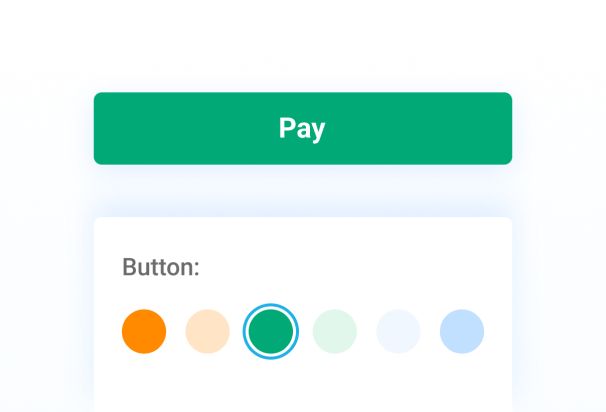
From adding your logo to personalizing styling options, brand colors, fonts, and even the loading page, we empower you to create a cohesive and branded payment experience for your customers.
Level 2: Payment Form and Outgoing Messages
Besides payment form customization, you can also give your outgoing emails a personalized touch by incorporating your brand’s logo, personalizing the sender’s name, and customizing your company’s privacy policy disclosure. This approach ensures every aspect of your customer interactions reflects your unique brand identity.
Level 3: Payment Form, Outgoing Messages, and SIBS Backoffice
In addition to customizing the payment form and outgoing messages, you can tailor the backoffice platform with your logo and brand elements to create a distinct representation that aligns perfectly with your company’s branding.
For more information about our full customization (white label) solution, contact us.
SIBS Gateway Documentation
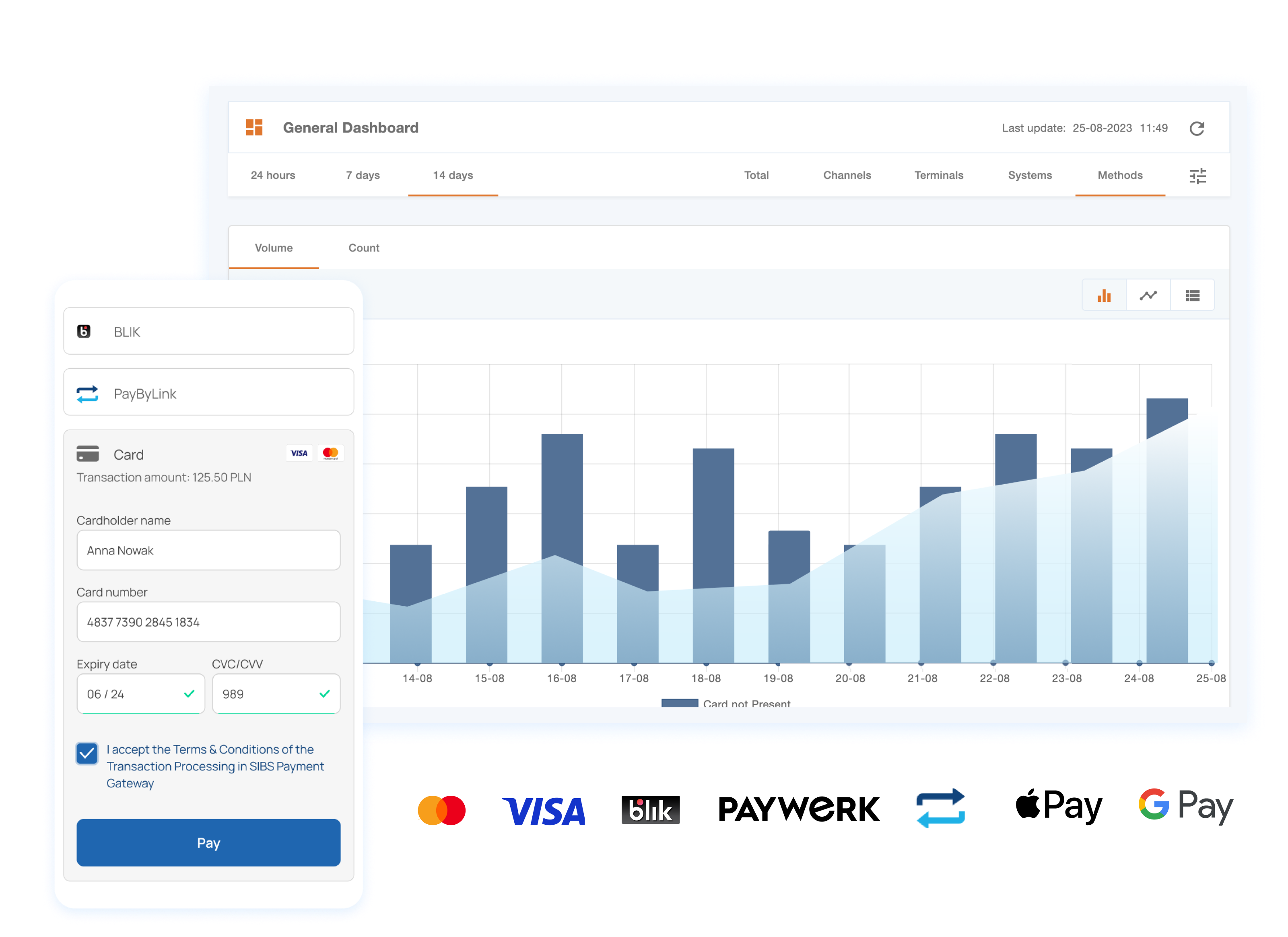
Integrated payment ecosystem
SIBS digital payments framework empowers seamless global payment acceptance. Going beyond mere transactions, our solutions include personalized checkout experiences, streamlined payouts, effortless invoicing, and simplified management.
These valuable capabilities, all integrated within a unified platform, work together to enhance your business operations.
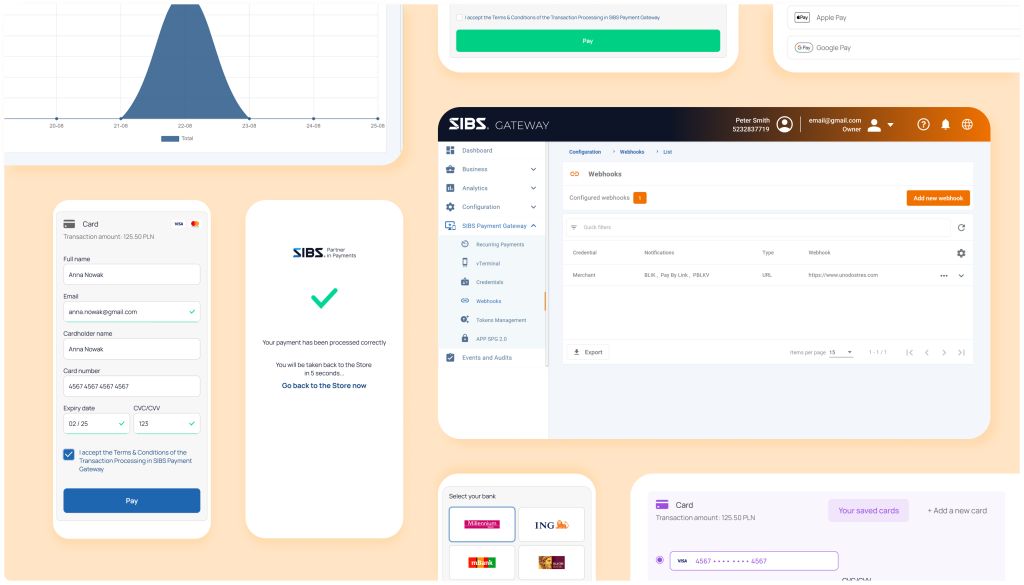
What’s in it for you?


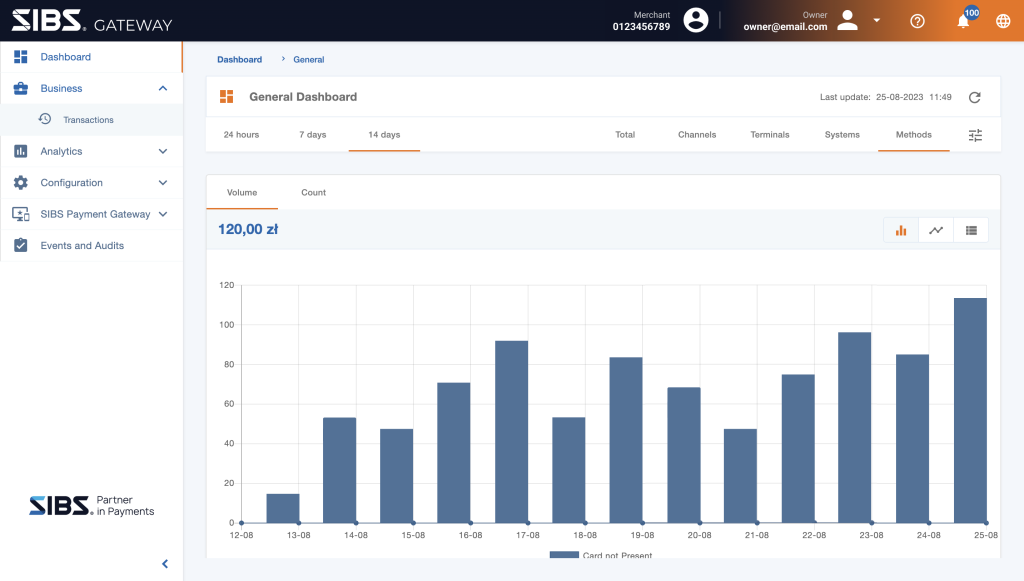
Empower your business with SIBS Backoffice
Simplify and accelerate your payment operations with SIBS Backoffice user-friendly interface. With our intuitive platform, you can effortlessly configure and oversee your payment transactions.
Tap into valuable insights through our analytics tools and fine-tune your operations to achieve remarkable efficiency improvements, yielding significant and impactful outcomes.
Ready to start the journey?
Start your integration today or contact our sales team and explore how we can help you accelerate your business.
Handling notifications
A webhook is an API that delivers real-time information regarding changes in the payment status of transactions.
The Merchant can receive the notifications either by email or endpoint (notification assembling to the status inquiry – Checkout Status), however only a notification will be sent for each transaction.
Merchants can receive notifications either by email or through an endpoint (notification assembled for the status inquiry – Checkout Status). However, only one notification will be sent for each transaction.
Notifications are sent directly to the endpoint (URL) configured by the merchant. The parameterization of this endpoint needs to be done in the SIBS Backoffice.
Each time the SIBS Gateway receives an update on the payment status of a transaction, a notification will be sent with the new transaction paymentStatus.
Every day, the SIBS Gateway sends a summarized email with the latest failed notifications (the email needs to be registered in the SIBS Backoffice).
There is no guarantee on the order of messages, especially if the time difference between the notifications is smaller than the time it takes to process them or due to any communication or systems issues. Once the issues are resolved, new notifications will arrive in real time, and old notifications will be resent. If no notification is received, the “Checkout Status” option should be used before rejecting any transaction.
Notifications are sent as HTTPS callbacks (webhooks) to an endpoint on your server. Please ensure that you have a valid SSL certificate chain. Self-signed certificates are not valid.
How it works?
To receive notifications, you need a server that has the following:
- An endpoint capable of receiving HTTP POST requests.
- An open TCP port for HTTPS traffic (port 443 or 80) with TLSv1.2 encryption.
Depending on your network and security requirements, you may also need to whitelist our network on your firewall. To ensure that your server correctly handles notifications, we require you to acknowledge every type of notification with an HTTP 200 and a response that includes:
{
 "statusCode": "200",
 "statusMsg": "Success",
 "notificationID": "2533e456-5e36-42c8-9eea-7961902f185e"
}
When your server receives a notification, it should:
- Decrypt the notification
- Store the notification in your database
- Acknowledge the notification with an HTTP 200 OK as explained before.
Decrypt
The content of notification is encrypted to protect data from fraud attempts. When converting human-readable string to hexadecimal format, we use UTF-8.
- Encryption algorithm : AES
- Block mode : GCM
- Padding : None
- Initialization Vector : In HTTP header (X-Initialization-Vector)
- Authentication Tag : In HTTP header (X-Authentication-Tag)
- Format of body: Base64
- Format of Initialization Vector: Base64
Test notification example:
Secret: O0Bur9uhZkS54NkwFhVyeutED6DhLbOQUBDt3i3W/C4=
X-Authentication-Tag: Ytw9bzOS1pXqizAKMGXVQ==
Content-Type: text/plain
X-Initialization-Vector: Ldo3OyWNgRchSF3C
Body before decryption:
WgErmJOV6wg3BuRkrgZLUUnh57BYzhIzvBFdpadHRsc43UcjtZEevRGDIDu3YxocXMXe8O+xQpMRxwTJPv766IaNqUiUEjAIjZSMEYCZ0pBursUYB+9nB4eqNUiAS2MJ9sR+Cj2iBf6G6KXLfp9K6dK7c0UED5XrJwbovY8X8pMyxktFTEaflp0e76ZywsCQvtqEtqNz9uYEyqmAANbsBwbwyWpkCC8H1kZN2fV3CYetW1CTPmWdPp3C18Yfh826NN4XlKu1VmUmea70PyjmRKSsjPXpfrRX8udelVIK2WTFtnRxD4x588d1nlGY5D5DQmJ8KYZzfvjTmDXGAPiRIEGuXp8h6rBQXS8P/m1llBtboGgQv4MmW3zvq0G6KFlYIcM=Body after decryption:
{
 "returnStatus": {
 "statusMsg": "Success",
 "statusCode": "000"
 },
 "paymentStatus": "Success",
 "paymentMethod": "CARD",
 "transactionID": "WebhookTest",
 "amount": {
 "currency": "EUR",
 "value": 10.0
 },
 "merchant": {
 "terminalId": 1000000
 },
 "paymentType": "PURS",
 "notificationID": "f153c248-e7be-4c12-8d88-6c9f1f3b83e4"
}
Examples
Below, you will find some examples demonstrating how to decrypt the webhook notification:
- C#
- JAVA
- PHP
- PYTHON
using System;
using System.Security.Cryptography;
using System.Text;public static class Program {public static void Main() {byte[] secret = System.Convert.FromBase64String("6fNDiYU0T0/evFpmfycNai/AqF24i+rT0OmuVw0/sGQ=");byte[] ciphertext = System.Convert.FromBase64String("9bIjURJIcwoKvQr+ifOTH3HbMX+IqmsRqHuG/I1GfbSX89JE5DcWh/p8QROC5pRAuYZ7"+"ln7RSkHXJdZpVz1LFQ2859WsetvHHui7qYmfxATOO1j0AQuPdAD3FeRH0kR4s/v3c2nV8"+"1DnUXFCnQER/+VWrYdbu5vn8gm+diSE6CHvkK+ODy0ebVi5O6VBnWVjgBUG33VwWiAyIl"+"7Ik435V55WnZgynH3GfbVYoGwZ5UhYtn3yw2yruiLAKu6VTBvnh/ZJP21cHCJSF6NPSd+8"+"1gzWFU/+ECm3cf3uBbCkmKmL7HxRhRxhG0lMtX6ELZOXuw3eDJ1BTu+sSMkV/5Xk+5XX48"+"XmP6CGZ7KmP7Q3Fw1kZmhn0unFyv0Gw8PjT1Ohny/HMgNl16I=");byte[] nonce = System.Convert.FromBase64String("RYjpCMtUmK54T6Lk");byte[] tag = System.Convert.FromBase64String("FUajWHmZjP4A5qaa1G0kxw==");using (var aes = new AesGcm(secret))

 {var plaintextBytes = new byte[ciphertext.Length];

aes.Decrypt(nonce, ciphertext, tag, plaintextBytes);string decrypt = Encoding.UTF8.GetString(plaintextBytes);

 Console.WriteLine(decrypt);


 }
 }
}
import java.security.Security;
import java.util.Base64;import javax.crypto.Cipher;
import javax.crypto.spec.IvParameterSpec;
import javax.crypto.spec.SecretKeySpec;import com.google.common.base.Charsets;import org.apache.commons.lang3.ArrayUtils;
import org.bouncycastle.jce.provider.BouncyCastleProvider;// For Java and JVM-based languages, you might need to install unrestricted policy file for JVM,
// which is provided by Sun. Please refer BouncyCastle FAQ if you get
// java.lang.SecurityException: Unsupported keysize or algorithm parameters or
// java.security.InvalidKeyException: Illegal key size.
// If you cannot install unrestricted policy file for JVM because of some reason, you can try with reflection: See here.public class Test {public static void main(String[] args) {try {
Security.addProvider(new BouncyCastleProvider());// Data from configurationString keyFromConfiguration = "6fNDiYU0T0/evFpmfycNai/AqF24i+rT0OmuVw0/sGQ=";// Data from serverString ivFromHttpHeader = "RYjpCMtUmK54T6Lk";String authTagFromHttpHeader = "FUajWHmZjP4A5qaa1G0kxw==";String httpBody = "9bIjURJIcwoKvQr+ifOTH3HbMX+IqmsRqHuG/I1GfbSX89JE5DcWh/p8QROC5pRAuYZ7"
+"ln7RSkHXJdZpVz1LFQ2859WsetvHHui7qYmfxATOO1j0AQuPdAD3FeRH0kR4s/v3c2nV8"
+"1DnUXFCnQER/+VWrYdbu5vn8gm+diSE6CHvkK+ODy0ebVi5O6VBnWVjgBUG33VwWiAyIl"
+"7Ik435V55WnZgynH3GfbVYoGwZ5UhYtn3yw2yruiLAKu6VTBvnh/ZJP21cHCJSF6NPSd+8"
+"1gzWFU/+ECm3cf3uBbCkmKmL7HxRhRxhG0lMtX6ELZOXuw3eDJ1BTu+sSMkV/5Xk+5XX48"
+"XmP6CGZ7KmP7Q3Fw1kZmhn0unFyv0Gw8PjT1Ohny/HMgNl16I=";// Convert data to processbyte[] key = Base64.getDecoder().decode(keyFromConfiguration);byte[] iv = Base64.getDecoder().decode(ivFromHttpHeader);byte[] authTag = Base64.getDecoder().decode(authTagFromHttpHeader);byte[] encryptedText = Base64.getDecoder().decode(httpBody);// Unlike other programming language, We have to append auth tag at the end of
// encrypted text in Javabyte[] cipherText = ArrayUtils.addAll(encryptedText, authTag);// Prepare decryptionSecretKeySpec keySpec = new SecretKeySpec(key, 0, 32, "AES");Cipher cipher = Cipher.getInstance("AES/GCM/NoPadding");
cipher.init(Cipher.DECRYPT_MODE, keySpec, new IvParameterSpec(iv));
// Decryptbyte[] bytes = cipher.doFinal(cipherText);
System.out.println(new String(bytes, Charsets.UTF_8));
} catch (Exception e) {
e.printStackTrace();
}
}
}function sodium_decrypt( $webhookSecret, $iv_from_http_header, $http_body , $auth_tag_from_http_header ){$key = mb_convert_encoding($webhookSecret, "UTF-8", "BASE64");$iv = mb_convert_encoding($iv_from_http_header, "UTF-8", "BASE64");$cipher_text = mb_convert_encoding($http_body, "UTF-8", "BASE64") . mb_convert_encoding($auth_tag_from_http_header, "UTF-8", "BASE64");$result = sodium_crypto_aead_aes256gcm_decrypt($cipher_text, "", $iv, $key);return $result;
}$webhookSecret = "6fNDiYU0T0/evFpmfycNai/AqF24i+rT0OmuVw0/sGQ=";
$iv_from_http_header = "RYjpCMtUmK54T6Lk";
$auth_tag_from_http_header = "FUajWHmZjP4A5qaa1G0kxw==";
$http_body = "9bIjURJIcwoKvQr+ifOTH3HbMX+IqmsRqHuG/I1GfbSX89JE5DcWh/p8QROC5pRAuYZ7" .
"ln7RSkHXJdZpVz1LFQ2859WsetvHHui7qYmfxATOO1j0AQuPdAD3FeRH0kR4s/v3c2nV8" .
"1DnUXFCnQER/+VWrYdbu5vn8gm+diSE6CHvkK+ODy0ebVi5O6VBnWVjgBUG33VwWiAyIl" .
"7Ik435V55WnZgynH3GfbVYoGwZ5UhYtn3yw2yruiLAKu6VTBvnh/ZJP21cHCJSF6NPSd+8" .
"1gzWFU/+ECm3cf3uBbCkmKmL7HxRhRxhG0lMtX6ELZOXuw3eDJ1BTu+sSMkV/5Xk+5XX48" .
"XmP6CGZ7KmP7Q3Fw1kZmhn0unFyv0Gw8PjT1Ohny/HMgNl16I=";// Decrypt message
$result = sodium_decrypt($webhookSecret, $iv_from_http_header, $http_body , $auth_tag_from_http_header);print($result);import base64
from Cryptodome.Cipher import AESdef decrypt_AES_GCM(encryptedMsg, authTag, secretKey, iv):
iv = base64.b64decode(iv)
encryptedMsg = base64.b64decode(encryptedMsg)
secretKey = base64.b64decode(secretKey)
authTag = base64.b64decode(authTag)
aesCipher = AES.new(secretKey, AES.MODE_GCM, iv)
plaintext = aesCipher.decrypt_and_verify(encryptedMsg, authTag)return plaintext
example = {"encoded" : "9bIjURJIcwoKvQr+ifOTH3HbMX+IqmsRqHuG/I1GfbSX89JE5DcWh/p8QROC5pRAuYZ7" \
"ln7RSkHXJdZpVz1LFQ2859WsetvHHui7qYmfxATOO1j0AQuPdAD3FeRH0kR4s/v3c2nV8" \
"1DnUXFCnQER/+VWrYdbu5vn8gm+diSE6CHvkK+ODy0ebVi5O6VBnWVjgBUG33VwWiAyIl" \
"7Ik435V55WnZgynH3GfbVYoGwZ5UhYtn3yw2yruiLAKu6VTBvnh/ZJP21cHCJSF6NPSd+8" \
"1gzWFU/+ECm3cf3uBbCkmKmL7HxRhRxhG0lMtX6ELZOXuw3eDJ1BTu+sSMkV/5Xk+5XX48"
"XmP6CGZ7KmP7Q3Fw1kZmhn0unFyv0Gw8PjT1Ohny/HMgNl16I=","iv" : "RYjpCMtUmK54T6Lk","tag" : "FUajWHmZjP4A5qaa1G0kxw==","secret" : "6fNDiYU0T0/evFpmfycNai/AqF24i+rT0OmuVw0/sGQ="}
result = decrypt_AES_GCM(example['encoded'], example['tag'], example['secret'], example['iv'])
print(result)API operations
In this section, we’ll delve into the webhook API operations, encompassing the processes of webhook creation, webhook list retrieval, and webhook updates, covering various aspects such as the operation method, endpoint, and request details.
Create webhook
In this segment we will explore the process of creating webhooks, outlining the necessary steps, parameters, and authentication details.
Endpoints:
| Operation | Operation Type | Operation Method & Endpoint | Operation Description |
|---|---|---|---|
| Create Webhook Request | Call | POST version-id/acquirers/{acquirer-id}/merchants/{merchant-id}/terminal/webhook | Set up a Webhook creation resource. |
The following table presents the details required for initiating a Create Webhook operation:
| Location | Data Element | Type | Condition | Description |
|---|---|---|---|---|
| Path | acquirer-id | Max25NumericText | Mandatory | Acquirer code |
| Path | merchant-id | Max10NumericText | Mandatory | Acquirer code |
| Query Parameter | acceptorId | Max10NumericText | Optional | Acceptor code in Merchant |
| Query Parameter | terminalId | Max10NumericText | Optional | Terminal code |
Header parameters:
| Data Element | Type | Condition | Description |
|---|---|---|---|
| Content-Type | String | Mandatory | application/json |
| Authorization | String | Mandatory | Bearer Token. Based on OAuth2 authentication performed in a pre-step. |
| x-ibm-client-id | String | Mandatory | Token that identifies a client organisation. It is provided during onboarding process and must be used in every call. |
| TPP-Request-ID | String | Mandatory | ID of the request, unique to the call, as determined by the initiating party. |
| User-ID | String | Mandatory | Identification of the user responsible for the request (required for audit purposes). |
| User-Organization-ID | String | Mandatory | Identification of the organization responsible for the request (required for audit purposes). |
Request parameters:
| Location | Data Element | Type | Condition | Description |
|---|---|---|---|---|
| Request Body | notificationConfigurationCode | Max35Text | Mandatory | Notification configuration UUID. |
| Request Body | requestOperationType | Max3Text | Mandatory | Request operation type code Enum: INS – Insert DEL – Delete Set with ‘INS’. |
| Request Body | paymentMethods | Payment methods | Mandatory | Array of payment methods. |
| Request Body.paymentMethods | paymentMethodNotificationCode | Max15Text | Mandatory | Payment method notification type code Enum: CARD-‘Card Payments’ PYBL-‘Pay By Link – Blue Media’ PLKV-‘Pay By Link – kevin’ BLIK-‘BLIK’ XPAY-‘XPAY Payments’ BNPL-‘Buy Now Pay Later -Paywerk’ GRPY-‘Giropay’ SFRT-‘Sofort’ BNCT-‘Bancontact’ IDEL-‘Ideal’ |
| Request Body | channelTypeNotification | Channel Type Notification | Mandatory | It comprises all channel type notification related data. |
| Request Body.channelTypeNotification | notificationType | Max5Text | Mandatory | Notification type code Enum: URL |
| Request Body.channelTypeNotification | value | Max2048Text | Mandatory | Notification value (email or URL) |
| Request Body.channelTypeNotification | security | Security | Conditional | It comprises all security related data. This structure (and all related data elements only) should be presented if Notification type code value is ‘URL’. |
| Request Body.channelTypeNotification.security | key | Max32Text (Base64) | Conditional | Security key (secret). |
| Request Body.channelTypeNotification.security | supportEmail | Max256Text | Conditional | Support email. |
| Request Body.channelTypeNotification.security | algorithm | Max70Text | Conditional | Algorithm. Set with ‘AES-256-GCM’. |
Here, you can review the response structure resulting from the Create Webhook operation:
| Location | Data Element | Type | Condition | Description |
|---|---|---|---|---|
| Response Header | TPP-Request-ID | UUID | Mandatory | ID of the request, unique to the call, as determined by the initiating party. |
| Response Body | transactionStatus | Transaction Status | Mandatory | Transaction Status. Possible values are “ACTC-Accepted Technical Validation” and “RJCT-Rejected”. |
| Response Body | returnStatus | Return Status | Mandatory | |
| Response Body.returnStatus | statusCode | Message Code | Mandatory | “000” for success. Values different from “000” refer to errors. |
| Response Body.returnStatus | statusMsg | Message Type | Mandatory | Result message. |
| Response Body.returnStatus | statusDescription | Max512Text | Mandatory | Additional explaining text. |
Get webhook list
In this section, we provide the details on the Get Webhook List operation, encompassing the operation method, endpoint, and necessary elements to retrieve a list of webhooks, with both the API request and response structures for your reference.
| Operation | Operation Type | Operation Method & Endpoint | Operation Description |
|---|---|---|---|
| Get Webhook List Request | Call | POST version-id/webhooks | Get webhook list. |
The table below outlines the required data elements and their conditions for initiating the request.
Header parameters:
| Location | Data Element | Type | Condition | Description |
|---|---|---|---|---|
| Request Header | Content-Type | String | Mandatory | application/json |
| Request Header | Authorization | String | Mandatory | Bearer Token. Based on OAuth2 authentication performed in a pre-step. |
| Request Header | x-ibm-client-id | String | Mandatory | Token that identifies a client organization. It is provided during onboarding process and must be used in every call. |
| Request Header | TPP-Request-ID | UUID | Mandatory | ID of the request, unique to the call, as determined by the initiating party. |
| Request Header | User-ID | String | Mandatory | Identification of the user responsible for the request (required for audit purposes). |
| Request Header | User-Organization-ID | String | Mandatory | Identification of the organization responsible for the request (required for audit purposes). |
Request parameters:
| Location | Data Element | Type | Condition | Description |
|---|---|---|---|---|
| Request Body | acquirerId | Max25NumericText | Mandatory | Acquirer code |
| Request Body | merchantId | Max10NumericText | Mandatory | Merchant code |
| Request Body | acceptorId | Max10NumericText | Optional | Acceptor code |
| Request Body | terminalId | Max10NumericText | Optional | Terminal code |
This table outlines the expected response elements:
| Location | Data Element | Type | Condition | Description |
|---|---|---|---|---|
| Response Header | TPP-Request-ID | UUID | Mandatory | ID of the Response, unique to the call, as determined by the initiating party. |
| Response Body | transactionStatus | Transaction Status | Mandatory | Transaction Status. Possible values are “ACTC-Accepted Technical Validation” and “RJCT-Rejected”. |
| Response Body | returnStatus | Return Status | Mandatory | |
| Response Body.returnStatus | statusCode | Status Code | Mandatory | “000” for success. Values different from “000” refer to errors. |
| Response Body.returnStatus | statusMsg | Message Type | Mandatory | Result message. |
| Response Body.returnStatus | statusDescription | Max512Text | Mandatory | Additional explaining text. |
| Response Body | webhooks | Array of webhooks | Conditional | Webhook details resource data list. Only present in success responses. |
| Response Body.webhooks | webhook | Webhook | Mandatory | Array webhooks. |
| Response Body.webhooks.webhook | notificationConfigurationCode | Max36Text | Mandatory | Notification configuration UUID. |
| Response Body | paymentMethods | payment methods | Mandatory | Array of payment methods. |
| Response Body.paymentMethods | paymentMethodNotificationCode | Max15Text | Mandatory | Payment method notification type code Enum: CARD-‘Card Payments’ PYBL-‘Pay By Link – Blue Media’ PLKV-‘Pay By Link – kevin’ BLIK-‘BLIK’ XPAY-‘XPAY Payments’ BNPL-‘Buy Now Pay Later -Paywerk’ GRPY-‘Giropay’ SFRT-‘Sofort’ BNCT-‘Bancontact’ IDEL-‘Ideal’ |
| Response Body.webhooks.webhook | channelTypeNotification | Channel Type Notification | Mandatory | It comprises all channel type notification related data. |
| Response Body.webhooks.webhook.channelTypeNotification | notificationType | Max5Text | Mandatory | Notification type code Enum: URL |
| Response Body.webhooks.webhook.channelTypeNotification | value | Max2048Text | Mandatory | Notification value (email or URL). |
| Response Body.webhooks.webhook.channelTypeNotification | security | Security | Conditional | It comprises all security related data. This structure (and all related data elements only) should be presented if Notification type code value is ‘URL’. |
| Response Body.webhooks.webhook.channelTypeNotification.security | key | Max32Text (Base64) | Conditional | Security key (secret). |
| Response Body.webhooks.webhook.channelTypeNotification.security | supportEmail | Max256Text | Conditional | Support email. |
| Response Body.webhooks.webhook.channelTypeNotification.security | algorithm | Max70Text | Conditional | Algorithm. |
Update webhooks
Here we address the operation method, endpoint, and relevant elements required for modifying a webhook resource. This includes a coverage of the API request and response structures for your reference.
| Operation | Operation Type | Operation Method & Endpoint | Operation Description |
|---|---|---|---|
| Update Webhook Request | Call | PUT version-id/acquirers/{acquirer-id}/merchants/{merchant-id}/terminal/webhook | Update a Webhook resource. |
The following table presents the essential elements for initiating an Update Webhook request:
| Location | Data Element | Type | Condition | Description |
|---|---|---|---|---|
| Path | acquirer-id | Max25NumericText | Mandatory | Acquirer code. |
| Path | merchant-id | Max10NumericText | Mandatory | Merchant code. |
| Query Parameter | acceptorId | Max10NumericText | Optional | Acceptor code in Merchant. |
| Query Parameter | terminalId | Max10NumericText | Optional | Terminal code. |
Header parameters:
| Location | Data Element | Type | Condition | Description |
|---|---|---|---|---|
| Request Header | Content-Type | String | Mandatory | application/json |
| Request Header | Authorization | String | Mandatory | Bearer Token. Based on OAuth2 authentication performed in a pre-step. |
| Request Header | x-ibm-client-id | String | Mandatory | Token that identifies a client organisation. It is provided during onboarding process and must be used in every call. |
| Request Header | TPP-Request-ID | UUID | Mandatory | ID of the request, unique to the call, as determined by the initiating party. |
| Request Header | User-ID | String | Mandatory | Identification of the user responsible for the request (required for audit purposes). |
| Request Header | User-Organization-ID | String | Mandatory | Identification of the organization responsible for the request (required for audit purposes). |
Request parameters:
| Location | Data Element | Type | Condition | Description |
|---|---|---|---|---|
| Request Body | notificationConfigurationCode | Max35Text | Mandatory | Notification configuration UUID. |
| Request Body | requestOperationType | Max3Text | Mandatory | Request operation type code Enum: INS – Insert DEL – Delete Set with ‘INS’. |
| Request Body | paymentMethods | payment methods | Mandatory | Array of payment methods. |
| Request Body.paymentMethods | paymentMethodNotificationCode | Max15Text | Mandatory | Payment method notification type code Enum: CARD-‘Card Payments’ PYBL-‘Pay By Link – Blue Media’ PLKV-‘Pay By Link – kevin’ BLIK-‘BLIK’ XPAY-‘XPAY Payments’ BNPL-‘Buy Now Pay Later -Paywerk’ GRPY-‘Giropay’ SFRT-‘Sofort’ BNCT-‘Bancontact’ IDEL-‘Ideal’ |
| Request Body | channelTypeNotification | Channel Type Notification | Mandatory | It comprises all channel type notification related data. |
| Request Body.channelTypeNotification | notificationType | Max5Text | Mandatory | Notification type code Enum: URL |
| Request Body.channelTypeNotification | value | Max2048Text | Mandatory | Notification value (email or URL) |
| Request Body.channelTypeNotification | security | Security | Conditional | It comprises all security related data. This structure (and all related data elements only) should be presented if Notification type code value is ‘URL’. |
| Request Body.channelTypeNotification.security | key | Max32Text | Conditional | Security key (secret). |
| Request Body.channelTypeNotification.security | supportEmail | Max256Text | Conditional | Support email. |
| Request Body.channelTypeNotification.security | algorithm | Max70Text | Conditional | Algorithm. Set with ‘AES-256-GCM’. |
This table outlines the response components for the Update Webhook operation:
| Location | Data Element | Type | Condition | Description |
|---|---|---|---|---|
| Response Header | TPP-Request-ID | UUID | Mandatory | ID of the request, unique to the call, as determined by the initiating party. |
| Response Body | transactionStatus | Transaction Status | Mandatory | Transaction Status. Possible values are “ACTC-Accepted Technical Validation” and “RJCT-Rejected”. |
| Response Body | returnStatus | Return Status | Mandatory | |
| Response Body.returnStatus | statusCode | Message Code | Mandatory | “000” for success. Values different from “000” refer to errors. |
| Response Body.returnStatus | statusMsg | Message Type | Mandatory | Result message. |
| Response Body.returnStatus | statusDescription | Max512Text | Mandatory | Additional explaining text. |
Setup
Use SIBS Backoffice to establish webhooks and stay updated regarding your payments. Follow the subsequent steps and choose the appropriate options that correspond to your desired updates.
To take advantage of this feature, you can easily set up webhooks to receive notifications for events within your account. This will enable you to stay informed and take appropriate actions when necessary.
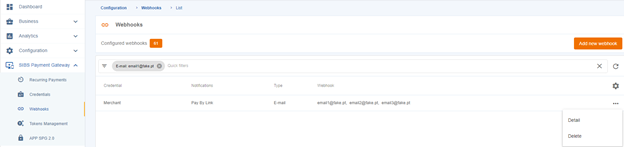
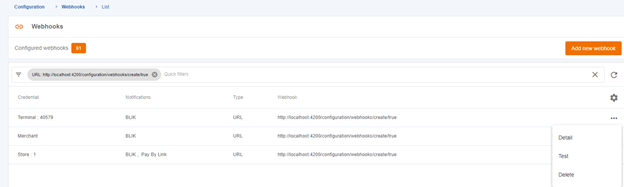
In the “Webhooks” menu, you can view a list of all your webhooks. You can quickly apply filters by credential, notifications, type, and webhook (email or URL).
When you click on the Webhook icon, two options may be presented depending on the type of webhook. If the webhook is a URL type, you can access its details and test it. If the webhook is an email type, you can only view its details in more depth.
Add a new Webhook
Step 1: Choose Webhook type (Mandatory)
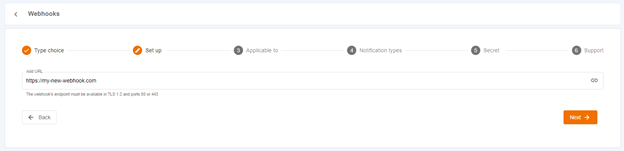
Step 2: Add an URL (Mandatory)
Step 3: Webhook application choice (Mandatory)
Step 4: Choose notification types (Mandatory)
Step 5: Webhook secret (Mandatory)
Step 6: Webhook email for support
To create a new webhook, you need to click on the “Add new webhook” button. Then, a set of steps will be presented to guide you in filling in the necessary data to create a webhook. The following images show an example of creating a URL-type webhook.
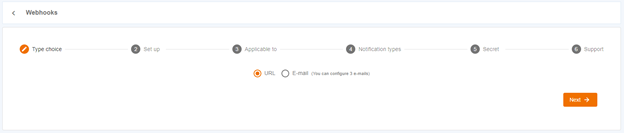
Step 1: Choose Webhook type (Mandatory)
When it comes to delivering notifications, a webhook for URL sends real-time data by making an HTTP request to a specified endpoint, whereas a webhook for email delivers the notifications by sending them as email messages to a designated email address.
Step 2: Add an URL (Mandatory)
Step 3: Webhook application choice (Mandatory)
Webhooks can be defined for the merchant, store, or terminal. If they are defined for the merchant, they will apply to all stores and terminals contained within it.
Defining webhooks for a store only applies to the terminals within that store.
If you want to define a webhook for a specific terminal, you should choose that option.

Step 4: Choose notification types (Mandatory)

Step 5: Webhook secret (Mandatory)

Step 6: Webhook email for support

Once all the required data has been filled in, you can click on the “Create webhook” button to create the webhook.
Webhook delete
If you have the permission to manage webhooks, you can delete notifications that are no longer needed. To do this, you must click on the “Delete” option located in the top right corner of the Webhook details page. Once you click on it, an operation confirmation popup will be displayed, and you can delete the Webhook.
Webhook test
You can easily test a webhook as long as it is of type URL. To do this, simply click on the “Test” button and you will be directed to the webhook testing page. Once there, click the test button and wait for the request to complete successfully. The notification sent will then be displayed, confirming that the webhook is working correctly.

Webhook details
To view all the details of a webhook, you need to click on the “Details” option. This will provide you with a more detailed view of the webhook data. If you need to make any changes, simply click on the pencil icon to edit the information. Once you have updated the data, click on the save icon to ensure that the new information is saved.

Testing assets
Take advantage of these resources to help you test your integration across various scenarios.
Testing Credentials
Consult your Account Manager to initiate the onboarding process.
Once this process is finished, you will receive your testing credentials, including:
- Terminal Code
- Bearer Token
- Client ID
When you have your credentials, you are ready to start the integration process.
Within your testing environment, you gain the ability to:
- Digitally onboard your merchants, in case you are a Payment Facilitator
- Initiate your integration process
- Explore the features and tools at your disposal
- Conduct test payments
Keep in mind that a test account allows you to explore SIBS integrations but does not guarantee live payment processing.
Testing Cards
Prior to implementing live payment processing, you have the option to use the provided card details from this page for testing purposes.
Please note that these details are exclusively applicable on our testing platform and do not involve actual transactions or the transfer of any funds.
Here are some testing cards you can use:
| Brand | Card number | Expiry date | CVC/CVV | 3DS | 3DS Authentication password |
|---|---|---|---|---|---|
| Visa | 4176660000000100 | 12/25 | 597 | Yes (Challenge) | 123456 |
| Visa | 4761340000000035 | 12/25 | 536 | No | – |
| Mastercard | 5185520050000010 | 12/25 | 001 | Yes (Challenge) | 123456 |
| Mastercard | 5204740000001002 | 12/25 | 100 | Yes (Frictionless) | – |
| Mastercard | 5206361000001351 | 12/25 | 536 | No | – |
Handling responses
Response codes provide valuable insights into the outcome of an API request. This page provides a comprehensive description of the potential response codes you may encounter.
HTTP Status Codes
HTTP defines a set of forty standard status codes that communicate the results of a client’s request. These status codes are categorized into the following five groups:
| Category | Description | Details |
|---|---|---|
| 1xx | Informational | Communicates transfer protocol-level information. |
| 2xx | Success | Indicates that the client’s request was accepted successfully. |
| 3xx | Redirection | Indicates that the client must take some additional action in order to complete their request. |
| 4xx | Client Error | This category of error status codes points the finger at clients. |
| 5xx | Server Error | The server takes responsibility for these error status codes. |
| Code | Description | Detail and Action |
|---|---|---|
| 200 | OK | It indicates that the REST API successfully carried out whatever action the client requested and that no more specific code in the 2xx series is appropriate. Unlike the 204 status code, a 200 response should include a response body.The information returned with the response is dependent on the method used in the request, for example: GET an entity corresponding to the requested resource is sent in the response; HEAD the entity-header fields corresponding to the requested resource are sent in the response without any message-body; POST an entity describing or containing the result of the action; TRACE an entity containing the request message as received by the end server. |
| 201 | Created | A REST API responds with the 201 status code whenever a resource is created inside a collection. There may also be times when a new resource is created as a result of some controller action, in which case 201 would also be an appropriate response. The newly created resource can be referenced by the URI(s) returned in the entity of the response, with the most specific URI for the resource given by a Location header field. The origin server MUST create the resource before returning the 201 status code. If the action cannot be carried out immediately, the server SHOULD respond with a 202 (Accepted) response instead. |
| 202 | Accepted | A 202 response is typically used for actions that take a long while to process. It indicates that the request has been accepted for processing, but the processing has not been completed. The request might or might not be eventually acted upon, or even maybe disallowed when processing occurs. Its purpose is to allow a server to accept a request for some other process (perhaps a batch-oriented process that is only run once per day) without requiring that the user agent’s connection to the server persist until the process is completed. The entity returned with this response SHOULD include an indication of the request’s current status and either a pointer to a status monitor (job queue location) or some estimate of when the user can expect the request to be fulfilled. |
| 204 | No Content | The 204 status code is usually sent out in response to a PUT, POST, or DELETE request when the REST API declines to send back any status message or representation in the response message’s body. An API may also send 204 in conjunction with a GET request to indicate that the requested resource exists, but has no state representation to include in the body. If the client is a user agent, it SHOULD NOT change its document view from that which caused the request to be sent. This response is primarily intended to allow input for actions to take place without causing a change to the user agent’s active document view, although any new or updated metainformation SHOULD be applied to the document currently in the user agent’s active view. The 204 response MUST NOT include a message-body and thus is always terminated by the first empty line after the header fields |
| 205 | Reset Content | The server successfully processed the request, asks that the requester reset its document view, and is not returning any content. |
| 206 | Partial Content | The server is delivering only part of the resource (byte serving) due to a range header sent by the client. The range header is used by HTTP clients to enable resuming of interrupted downloads, or split a download into multiple simultaneous streams. |
| 300 | Multiple Choices | Indicates multiple options for the resource from which the client may choose (via agent-driven content negotiation). For example, this code could be used to present multiple video format options, to list files with different filename extensions, or to suggest word-sense disambiguation. |
| 301 | Moved Permanently | The 301 status code indicates that the REST API’s resource model has been significantly redesigned, and a new permanent URI has been assigned to the client’s requested resource. The REST API should specify the new URI in the response’s Location header, and all future requests should be directed to the given URI. You will hardly use this response code in your API as you can always use the API versioning for new API while retaining the old one. |
| 302 | Found | The HTTP response status code 302 Found is a common way of performing URL redirection. An HTTP response with this status code will additionally provide a URL in the Location header field. The user agent (e.g., a web browser) is invited by a response with this code to make a second. Otherwise identical, request to the new URL specified in the location field. Many web browsers implemented this code in a manner that violated this standard, changing the request type of the new request to GET, regardless of the type employed in the original request (e.g., POST). RFC 1945 and RFC 2068 specify that the client is not allowed to change the method on the redirected request. The status codes 303 and 307 have been added for servers that wish to make unambiguously clear which kind of reaction is expected of the client. |
| 303 | See Other | A 303 response indicates that a controller resource has finished its work, but instead of sending a potentially unwanted response body, it sends the client the URI of a response resource. The response can be the URI of the temporary status message, or the URI to some already existing, more permanent, resource. Generally speaking, the 303 status code allows a REST API to send a reference to a resource without forcing the client to download its state. Instead, the client may send a GET request to the value of the Location header. The 303 response MUST NOT be cached, but the response to the second (redirected) request might be cacheable. |
| 304 | Not Modified | This status code is similar to 204 (“No Content”) in that the response body must be empty. The critical distinction is that 204 is used when there is nothing to send in the body, whereas 304 is used when the resource has not been modified since the version specified by the request headers If-Modified-Since or If-None-Match. In such a case, there is no need to retransmit the resource since the client still has a previously-downloaded copy. Using this saves bandwidth and reprocessing on both the server and client, as only the header data must be sent and received in comparison to the entirety of the page being re-processed by the server, then sent again using more bandwidth of the server and client. |
| 307 | Temporary Redirect | A 307 response indicates that the REST API is not going to process the client’s request. Instead, the client should resubmit the request to the URI specified by the response message’s Location header. However, future requests should still use the original URI. A REST API can use this status code to assign a temporary URI to the client’s requested resource. For example, a 307 response can be used to shift a client request over to another host. The temporary URI SHOULD be given by the Location field in the response. Unless the request method was HEAD, the entity of the response SHOULD contain a short hypertext note with a hyperlink to the new URI(s). If the 307 status code is received in response to a request other than GET or HEAD, the user agent MUST NOT automatically redirect the request unless it can be confirmed by the user, since this might change the conditions under which the request was issued. |
| 400 | Bad Request | 400 is the generic client-side error status, used when no other 4xx error code is appropriate. Errors can be like malformed request syntax, invalid request message parameters, or deceptive request routing etc. The client SHOULD NOT repeat the request without modifications. |
| 401 | Unauthorized | A 401 error response indicates that the client tried to operate on a protected resource without providing the proper authorization. It may have provided the wrong credentials or none at all. The response must include a WWW-Authenticate header field containing a challenge applicable to the requested resource. The client MAY repeat the request with a suitable Authorization header field. If the request already included Authorization credentials, then the 401 response indicates that authorization has been refused for those credentials. If the 401 response contains the same challenge as the prior response, and the user agent has already attempted authentication at least once, then the user SHOULD be presented the entity that was given in the response, since that entity might include relevant diagnostic information. |
| 402 | Payment Required | Reserved for future use. The original intention was that this code might be used as part of some form of digital cash or micropayment scheme, as proposed, and this code is not widely used. |
| 403 | Forbidden | A 403 error response indicates that the client’s request is formed correctly, but the REST API refuses to honor it, i.e. the user does not have the necessary permissions for the resource. A 403 response is not a case of insufficient client credentials; that would be 401 (“Unauthorized”). Authentication will not help, and the request SHOULD NOT be repeated. Unlike a 401 Unauthorized response, authenticating will make no difference. |
| 404 | Not Found | The 404 error status code indicates that the REST API can’t map the client’s URI to a resource but may be available in the future. Subsequent requests by the client are permissible. No indication is given of whether the condition is temporary or permanent. The 410 (Gone) status code SHOULD be used if the server knows, through some internally configurable mechanism, that an old resource is permanently unavailable and has no forwarding address. This status code is commonly used when the server does not wish to reveal exactly why the request has been refused, or when no other response is applicable. |
| 405 | Method Not Allowed | The API responds with a 405 error to indicate that the client tried to use an HTTP method that the resource does not allow. For instance, a read-only resource could support only GET and HEAD, while a controller resource might allow GET and POST, but not PUT or DELETE. |
| 406 | Not Acceptable | The 406 error response indicates that the API is not able to generate any of the client’s preferred media types, as indicated by the Accept request header. For example, a client request for data formatted as application/xml will receive a 406 response if the API is only willing to format data as application/json. If the response could be unacceptable, a user agent SHOULD temporarily stop receipt of more data and query the user for a decision on further actions. |
| 407 | Proxy Authentication Required | The client must first authenticate itself with the proxy. |
| 408 | Request Timeout | The server timed out waiting for the request. According to HTTP specifications: “The client did not produce a request within the time that the server was prepared to wait. The client MAY repeat the request without modifications at any later time. |
| 409 | Conflict | Indicates that the request could not be processed because of conflict in the current state of the resource, such as an edit conflict between multiple simultaneous updates. |
| 410 | Gone | Indicates that the resource requested is no longer available and will not be available again. This should be used when a resource has been intentionally removed and the resource should be purged. Upon receiving a 410 status code, the client should not request the resource in the future. Clients such as search engines should remove the resource from their indices. Most use cases do not require clients and search engines to purge the resource, and a “404 Not Found” may be used instead. |
| 411 | Length Required | The request did not specify the length of its content, which is required by the requested resource |
| 412 | Precondition Failed | The 412 error response indicates that the client specified one or more preconditions in its request headers, effectively telling the REST API to carry out its request only if certain conditions were met. A 412 response indicates that those conditions were not met, so instead of carrying out the request, the API sends this status code. |
| 413 | Payload Too Large | The request is larger than the server is willing or able to process. Previously called “Request Entity Too Large” |
| 414 | URI Too Long | The URI provided was too long for the server to process. Often the result of too much data being encoded as a query-string of a GET request, in which case it should be converted to a POST request. Called “Request-URI Too Long” previously |
| 415 | Unsupported Media Type | The 415 error response indicates that the API is not able to process the client’s supplied media type, as indicated by the Content-Type request header. For example, a client request including data formatted as application/xml will receive a 415 response if the API is only willing to process data formatted as application/json. For example, the client uploads an image as image/svg+xml, but the server requires that images use a different format. |
| 416 | Range Not Satisfiable | The client has asked for a portion of the file (byte serving), but the server cannot supply that portion. For example, if the client asked for a part of the file that lies beyond the end of the file. Called “Requested Range Not Satisfiable” previously. |
| 417 | Expectation Failed | The server cannot meet the requirements of the Expect request-header field. |
| 421 | Misdirected Request | The server cannot meet the requirements of the Expect request-header field. |
| 422 | Unprocessable Entity | The request was well-formed but was unable to be followed due to semantic errors. |
| 423 | Locked | The resource that is being accessed is locked. |
| 424 | Failed Dependency | The request failed because it depended on another request and that request failed (e.g., a PROPPATCH). |
| 425 | Too Early | Indicates that the server is unwilling to risk processing a request that might be replayed. |
| 426 | Upgrade Required | The client should switch to a different protocol such as TLS/1.0, given in the Upgrade header field. |
| 428 | Precondition Required | The origin server requires the request to be conditional. Intended to prevent the ‘lost update’ problem, where a client GETs a resource’s state, modifies it, and PUTs it back to the server, when meanwhile a third party has modified the state on the server, leading to a conflict. |
| 429 | Too Many Requests | The user has sent too many requests in a given amount of time. Intended for use with rate-limiting schemes. |
| 431 | Request Header Fields Too Large | The server is unwilling to process the request because either an individual header field, or all the header fields collectively, are too large. |
| 451 | Unavailable For Legal Reasons | A server operator has received a legal demand to deny access to a resource or to a set of resources that includes the requested resource. |
| 500 | Internal Server Error | 500 is the generic REST API error response. Most web frameworks automatically respond with this response status code whenever they execute some request handler code that raises an exception. A 500 error is never the client’s fault, and therefore, it is reasonable for the client to retry the same request that triggered this response and hope to get a different response. API response is the generic error message, given when an unexpected condition was encountered and no more specific message is suitable. |
| 501 | Not Implemented | The server either does not recognize the request method, or it lacks the ability to fulfill the request. Usually, this implies future availability (e.g., a new feature of a web-service API). |
| 502 | Bad Gateway | The server was acting as a gateway or proxy and received an invalid response from the upstream server. |
| 503 | Service Unavailable | The server cannot handle the request (because it is overloaded or down for maintenance). Generally, this is a temporary state. |
| 504 | Gateway Timeout | The server was acting as a gateway or proxy and did not receive a timely response from the upstream server. |
| 505 | HTTP Version Not Supported | The server does not support the HTTP protocol version used in the request. |
| 506 | 506 Variant Also Negotiates | Transparent content negotiation for the request results in a circular reference. |
| 507 | Insufficient Storage | The server is unable to store the representation needed to complete the request. |
| 508 | Loop Detected | The server detected an infinite loop while processing the request (sent instead of 208 Already Reported). |
| 510 | Not Extended | Further extensions to the request are required for the server to fulfil it. |
| 511 | Network Authentication Required | The client needs to authenticate to gain network access. Intended for use by intercepting proxies used to control access to the network (e.g., “captive portals” used to require agreement to Terms of Service before granting full Internet access via a Wi-Fi hotspot). |
Code references
Codes serve as crucial identifiers in various domains, including the realm of payments.
Below you can find the ISO Codes used for:
Country
For the onboarding API you should use the ISO 3166 Numeric Code.
Currency
Language
Merchant onboarding
The API-based onboarding process eliminates the need for manual onboarding by automatically generating sponsored merchants, establishments, pricelists, terminals, and their corresponding credentials.

Please check below the available environment endpoints:
| Environment | URL | Operation Method & Endpoint | Operation Description |
|---|---|---|---|
| PROD | api.sibsgateway.com | POST api/onboarding/version-id/ sponsored-merchant | Performs a request to create the sponsored merchant record. |
| TEST | stargate-cer.qly.site1.sibs.pt | POST api/onboarding/version-id/ sponsored-merchant | Performs a request to create the sponsored merchant record. |
| Sandbox | sandbox.sibsgateway.com | POST api/onboarding/version-id/ sponsored-merchant | Performs a request to create the sponsored merchant record. |
To initiate this process, you are required to perform a POST request with the following data:
Header parameters:
| Parameter | Type | Condition | Description |
|---|---|---|---|
| Content-type | String | Mandatory | application/json. |
| X-Request-ID | String | Mandatory | ID of the request, unique to the call, as determined by the initiating party. |
| x-ibm-client-id | String | Mandatory | Token that identifies a client organization. It is provided during onboarding process and must be used in every call. |
Request parameters:
| Data Element | Type Length | Condition | Description |
|---|---|---|---|
| merchant | String | Mandatory | Object that defines the Merchant. |
| name | String <=90 | Mandatory | Company’s full name as per data in CEIDG. |
| phone | String <=16 | Mandatory | Company’s phone number. |
| String <=55 | Mandatory | Company’s email address. | |
| nip | String 8<11 | Mandatory | NIP as per CEIDG |
| mcc | Number 4-4 | Mandatory | Company’s MCC Code |
| pkd | String 7-7 | Mandatory | Company’s PKD (main) as per data in CEIDG |
| merchantType | String “Merchant” “Sponsored Merchant” Default: “Sponsored Merchant” | Mandatory | Merchant type |
| address | String | Mandatory | Merchant Address |
| street | String <=100 | Mandatory | Merchant’s Address Street |
| postalcode | String <=25 | Mandatory | Merchant’s Address Postal Code |
| locality | String <=20 | Mandatory | Merchant’s Address Locality |
| country | Number 3-3 Format ISO 3166, Number 3 code (ex: Poland – 616) | Mandatory | Merchant’s Address Country |
| website | String <=100 | Mandatory | Merchant’s website |
| signedAgreements | Boolean “True” “False” | Mandatory | Confirmation of signed agreements |
| backofficeEmail | String <=55 | Mandatory | SIBS Backoffice email address |
| pepStatus | String “Active” “Inactive” Default: “Active” | Mandatory | Potentially Exposed Person status |
| beneficialOwnersData | String <=40 | Conditional | Beneficial owners data. Only Mandatory if PEP Status is ‘Active’ |
| Owner | String | Mandatory | Object that defines the Company’s Owner account. It is possible to add more than one entry for this parameter |
| name | String <=40 | Mandatory | Owner’s name |
| phone | String <=16 | Conditional | Owner’s phone. Either the phone or the email (at least one of them) should be provided. |
| String <=55 | Conditional | Owner’s email Either the phone or the email (at least one of them) should be provided. | |
| address | String <=100 | Optional | Owner’s address |
| tin | Number 8<11 | Mandatory | Owner’s nip |
| integrationSupportContact | String | Optional | Object that defines an integration support contact |
| name | String <=20 | Optional | First and Last Name Contact for integration Support |
| phone | String <=16 | Conditional | Phone number Contact for integration Support Either the phone or the email (at least one of them) should be provided. |
| String <=55 | Conditional | Email address Contact for integration Support Either the phone or the email (at least one of them) should be provided. | |
| shop | Mandatory | Object that defines the Establishment | |
| name | String <=40 | Optional | Establishment Name. When this field is empty, the value to be considered will be the ones parametrized at the Merchant level. |
| address | String | Optional | Establishment Address When these fields are empty, the value to be considered will be the ones parametrized at the Merchant level. |
| street | String <=100 | Optional | Street |
| postalcode | String <=25 | Optional | Postal Code |
| locality | String <=20 | Optional | Locality |
| country | Number 3-3 Format ISO 3166, Number 3 code (ex: Poland – 616) | Optional | Country |
| String <=55 | Optional | Establishment Email When these fields are empty, the value to be considered will be the ones parametrized at the Merchant level. | |
| phoneNumber | String <=16 | Optional | Establishment Phone When these fields are empty, the value to be considered will be the ones parametrized at the Merchant level. |
| type | String “Banks” “Wholesale“ “Supermarket“ “Retail“ “Gas Stations“ “Restaurants“ “Hotels“ “Virtual Establishment“ “Foreign“ “Service Provider“ “Service Entity“ “EMV Tolls“ | Mandatory | Establishment Type |
| mcc | String 4-4 | Mandatory | Establishment MCC |
| pkd | String 7 The format of this parameter will be as Follows: 00.00.A (see list here: https://www.biznes.gov.pl/en/table-pkd-code) | Mandatory | Establishment CAE |
| InvoiceIndicator | String “Payment Facilitator” “Sponsored Merchant” Default: “Payment Facilitator” | Mandatory | Establishment Invoice Indicator |
| products | String | Mandatory | Object that defines the Establishment Products |
| productID | String “XPAY-APPL-0-0”, “XPAY-GGLE-0-0”, “PYWK-BNPL-1-0”, “PYWK-BNPL-2-0”, “INTP-BLIK-0-0”, “INTP-BLIK-1-0”, “BLMD-PYBL-0-0”, “KEVN-PYBL-0-0”, “MCC-1-C”, “MCC-1-D”, “MCC-1-P”, “MCC-2-C”, “MCC-2-P”, “MCC-4-C”, “MCC-4-D”, “MCC-4-P”, “MSI-1-D”, “MSI-1-P”, “MSI-2-D”, “MSI-2-P”, “VIS-01-C”, “VIS-01-D”, “VIS-01-P”, “VIS-02-C”, “VIS-02-D”, “VIS-02-P”, “VPY-03-D”, “VPY-03-P”, “VSL-01-C”, “VSL-01-D”, “VSL-01-P” | Mandatory | Payment methods selected by the customer. Product ID’s to activate: “INTP-BLIK-0-0” InterPay-BLIK-Domestic “INTP-BLIK-1-0” – InterPay-BLIK-OneClick “BLMD-PYBL-0-0” BlueMedia-PayByLink-Domestic “KEVN-PYBL-0-0” – PayByLink-Kevin “MCC-1-C” – Mastercard-Mastercard-Consumer-Credit “MCC-1-D” – Mastercard-Mastercard-Consumer-Debit “MCC-1-P” – Mastercard-Mastercard-Consumer-Prepaid “MCC-2-C” – Mastercard-Mastercard-Commercial-Credit “MCC-2-P” – Mastercard-Mastercard-Commercial-Prepaid “MCC-4-C” – Mastercard-Mastercard-Other-Credit “MCC-4-D” – Mastercard-Mastercard-Other-Debit “MCC-4-P” – Mastercard-Mastercard-Other-Prepaid “MSI-1-D” – Mastercard-Maestro-Consumer-Debit “MSI-1-P” – Mastercard-Maestro-Consumer-Prepaid “MSI-2-D” – Mastercard-Maestro-Commercial-Debit “MSI-2-P” – Mastercard-Maestro-Commercial-Prepaid “VIS-02-C” – VISA-VISA-Commercial-Credit “VIS-02-D” – VISA-VISA-Commercial-Debit “VIS-02-P” – VISA-VISA-Commercial-Prepaid “VIS-01-C” – VISA-VISA-Consumer-Credit “VIS-01-D” – VISA-VISA-Consumer-Debit “VIS-01-P” – VISA-VISA-Consumer-Prepaid “VPY-03-D” – VISA-VPAY-VPAY-Debit “VPY-03-P” – VISA-VPAY-VPAY-Prepaid “VSL-01-C” – VISA-VISA Electron-Consumer-Credit “VSL-01-D” – VISA-VISA Electron-Consumer-Debit “VSL-01-P” – VISA-VISA Electron-Consumer-Prepaid |
| productInvoiceIndicator | String “Payment Facilitator” “Sponsored Merchant” Default: “Payment Facilitator” | Optional | Product Invoice Indicator |
| paymentMethodType | String “Direct Debit” “Bank Transfer” Default: “Direct Debit” | Conditional | Payment method type for the invoicing of the sponsored merchant. This field is mandatory if the Invoice indicator is “Sponsored Merchant” |
| invoiceEmail | String <=55 | Conditional | Invoice email address. This field is mandatory if the Invoice indicator is “Sponsored Merchant” |
| payout | String | Conditional | Object that defines the Payout Information. Mandatory if InvoiceIndicator is “Sponsored Merchant” |
| bankAccount | String 26-26 | Conditional | Sponsored Merchants bank account Mandatory if InvoiceIndicator is “Sponsored Merchant” |
| iban | String <=34 | Conditional | Sponsored Merchants iban Mandatory if InvoiceIndicator is “Sponsored Merchant” |
| bic | String 8<11 | Conditional | Sponsored Merchants bic Mandatory if InvoiceIndicator is “Sponsored Merchant” |
| numDaysPayout | Number | Optional | Sponsored Merchants Payout Number of Days Reserved for future use. |
| maxPercentLowRiskExemptions | Number <=100 | Optional | The maximum percentage of low-risk exemptions allowed in a system or process. |
| scaExemption | String Default “0” | Optional | The field to evaluate SCA Exemptions must be filled with 1 to allow and 0 to not allow. |
| typeOfIntegration | String “S2S” “SDK” “Plugin” Default “S2S” | Mandatory | Sponsored merchant type of integration |
| webhookNotification | String | Conditional | Object that defines the webhook configuration details Mandatory if typeOfIntegration is “Plugin”. |
| type | String “URL” “Email” | Conditional | Type of webhook notifications. Mandatory if typeOfIntegration is “Plugin”. If “Plugin”, the value must be “URL” |
| Value | String | Conditional | A delivery email address (for email type), or an HTTP(S) URL Mandatory if typeOfIntegration is “Plugin” |
| supportEmail | String <=55 | Conditional | An email address to where all failed SPG Webhook calls will be reported by the end-of-day Mandatory if typeOfIntegration is “Plugin” |
| securityKey | String <=32 | Optional | A pseudo-random symmetric key that will be used to cipher the webhook content |
Find below a POST request example:
{
 "merchant": {
 "name": "JOHN DOE",
 "phone": "505102923",
 "email": "fds@op.pl",
 "nip": "6831968575",
 "mcc": "5969",
 "pkd": "86.90.E",
 "merchantType": "Sponsored Merchant",
 "address": {
 "street": "UL IMAGINARY",
 "postalCode": "85-132",
 "locality": "BYDGOSZCZ",
 "country": "616"
 },
 "website": "www.yolo.pl",
 "signedAgreements": true,
 "backofficeEmail": "fds@op.pl",
  "pepStatus": "Inactive",
 "owners": [
 {
 "name": "JANE DOE",
 "phone": "505102923",
 "email": "fds@op.pl",
 "address": "UL UGORY 85-132 BYDGOSZCZ POLSKA",
 "tin": "6831968575"
 }
 ],
 "shop": {
 "name": "YOLO",
 "address": {
 "street": "UL IMAGINARY",
 "postalCode": "85-132",
 "locality": "BYDGOSZCZ",
 "country": "616"
 },
 "email": "fds@op.pl",
 "phoneNumber": "505102923",
 "type": "Retail",
 "mcc": "5969",
 "pkd": "86.90.E",
 "invoiceIndicator": "Payment Facilitator",
 "products": [
 {
  "productId": "INTP-BLIK-0-0",
 "productInvoiceIndicator": "Payment Facilitator"
 },
 {
 "productId": "KEVN-PYBL-0-0",
 "productInvoiceIndicator": "Payment Facilitator"
 }
 ],
 "paymentMethodType": "Bank Transfer",
 "invoiceEmail": "fds@op.pl",
 "payout": {
 "bankAccount": "50116022020000000127761999",
 "iban": "PL50116022020000000127761999",
 "bic": "BIGBPLPW",
 "numDaysPayout": 1.0
 },
 "typeOfIntegration": "S2S",
 "webhookNotification": {
 "type": "URL",
 "value": ""
 },
 "supportEmail": "",
 "securityKey": ""
 }
 }
}
Upon this action, the API will respond with one of the following two status codes:
| Status Code | Message | TransactionStatus |
|---|---|---|
| 000 | Success | “ACT” (Accepted Technical Validation) |
| 999 | Unexpected Error | “RJT” (Rejected) |
Here is an example of a successful onboarding response:
{
"transactionStatus": "ACT",
 "returnStatus": {
 "statusCode": "000" "statusMsg": "Success",
 "statusDescription": "string"
 }
}
You will also receive the onboarding webhook, which includes the following merchant onboarding details and credentials.
Here’s a redacted example of a successful Webhook notification:
{
 "NotifyRequest": {
 "TrackingId": "00caa675-f811-45ed-aee3-b84c22ac3efc",
 "TIN": "000****123",
 "MerchantId": "PL-000****123-1",
 "ShopId": "SH-PL-000000321",
 "TerminalId": "POS000159",
 "ErrCode": "CRM000",
 "ErrDesc": "Success",
 "Agreements": {
 "AgreementType": "PLKV"
 },
 "Credentials": {
 "ApiClientId": "2a69a780-****-****-****-1c6308af85f0",
 "ApiClientSecret": "K1rK*******************************0uU6",
  "TerminalToken": "0277a2c645e93c43f59ce867ee55498293*******5272db028ad9c9fa250edd04d9cac5d42910950e2acb82034093d14830e649c3d6df2cc0f92268f79"
 }
 }
}Error handling
If a rejection occurs on the onboarding process, a synchronous response will be received that include a transactionstatus with the value RJCT (rejected) and a 999 StatusCode.
This response will contain error code and message fields that can assist you in identifying and resolving the issue.
Rejected onboarding response example:
{
"transactionStatus": "RJCT",
  "returnStatus": {
 "statusCode": "999",
 "statusMsg": "Internal Server Error",
 "statusDescription": "When invoiceIndicator is Sponsored Merchant invoiceEmail and payout object are mandatory."
 }
}
Webhooks Status Codes
Below you can find the range of Status Codes and Messages that you can receive via webhooks.
| Status Code | Message |
|---|---|
| CRM000 | Success |
| CRM001 | Sponsored Merchant already exists. |
| CRM002 | PKD is invalid |
| CRM003 | MCC code is invalid |
| CRM004 | NIP is invalid |
| CRM005 | IBAN is invalid |
| CRM006 | Product list doesn’t comply with Payment Facilitator agreement |
| CRM007 | Product code {} is invalid |
| CRM008 | Payment Facilitator is invalid |
| CRM009 | Product {} is not compatible with product {} |
| CRM010 | Invoice indicator is invalid for this Sponsored Merchant |
| CRM011 | This Product of Establishment has already been added as an Establishment Product. |
| CRM012 | Required field {} missing |
| CRM013 | The Country of the Establishment doesn’t match the Company Country |
| CRM014 | Sponsored Merchant Country does not match the Payment Facilitator Country |
| CRM999 | Unexpected Error |
Endpoints
The table below shows the available {API Host}.
| TEST Environment | PROD (live) Environment |
|---|---|
| stargate-cer.qly.site1.sibs.pt | api.sibsgateway.com |
Please refer to the following structure of the endpoint for your reference.
You should replace the placeholder {API Host} with the desired environment you want to use.
| General endpoint Checkout | https://{API Host}/api/v1/payments |
| General endpoint Check Status | https://{API Host}/api/v1/payments/:transactionId/status |
| Cards endpoint Card Purchase | https://{API Host}/api/v1/payments/:transactionId/card/purchase |
| Cards endpoint Card Token | https://{API Host}/api/v1/payments/:transactionId/token/purchase |
| Cards endpoint Card Recurring | https://{API Host}/api/v1/payments/:transactionId/recurring |
| Cards endpoint Card Capture | https://{API Host}/api/v1/payments/:transactionID/capture |
| Cards endpoint Card Cancellation | https://{API Host}/api/v1/payments/:transactionID/cancellation |
| BLIK endpoint Card Capture | https://{API Host}/api/v1/payments/:transactionId/blik/purchase |
| PayByLink endpoint Get Payment Channel | https://{API Host}/api/v2/paymentChannels |
| PayByLink endpoint Get Payment Link | https://{API Host}/v2/payments/:transactionId/pbl/payment-link |
| Apple Pay endpoint Payment request | https://{API Host}/api/v1/payments/:transactionId /xpay/payment |
| Google Pay endpoint Payment request | https://{API Host}/api/v1/payments/:transactionId /xpay/payment |
Release notes
Check out the latest updates for SIBS Gateway, starting from January 2023.
19 June 2023 – Release R02.20
New
- For BLIK it is now possible to make a payment without a code;
- Virtual terminal is now available on SIBS Backoffice;
- Outgoing email notifications now include a whitelabel solution, enabling to customize the footer message;
- Instant Onboarding is now available. When you onboard a merchant via API, the Client and terminal ID, and Credential Bearer Token are automatically generated and sent to the merchant’s email.
22 May 2023 – Release R02.19
New
- For Card Payment Method it is now possible to store payment card details without a purchase;
- Integration with Magento plugin is now available.
26 April 2023 – Release R02.18
New
- SIBS Backoffice now include a whitelabel solution for merchants;
- SIBS Gateway is now available for the following countries and currencies:
- Romania, RON
- Czechia, CZK
- Hungary, HUF
- Germany, EUR
27 March 2023 – Release R02.17
New
- WooCommerce plugin now supports OneClick Payment for Cards and Partial Refund;
- SIBS Gateway is now available for the following countries and currencies:
- Estonia, EUR
- Slovakia, EUR
- France, EUR
Improved
- WooCommerce plugin is now compatible with PHP8;
- Several improvements on the Payment Form UX/UI.
28 February 2023 – Release R02.16
New
- The Gross Settlement feature is now available, allowing commission deductions to occur only after invoice issuance, as opposed to the daily deductions in Net Settlement.
- SIBS Backoffice is now available in Polish and supports a multi-language solution that enables to translate it to any other language;
- Outgoing messages (email and SMS) are now available in Polish.
30 January 2023 – Release R02.15
New
- Prestashop plugin now supports OneClick Payment for Cards.

